VCF 9.1 is not just a component version bump. Broadcom’s VCF 9.1 guidance calls out management-plane changes such as the replacement of the standalone 9.0 Fleet Management Appliance with Fleet Lifecycle and SDDC Lifecycle services running inside VCF Management Services, the introduction of a centralized VCF License Server, and the consolidation of VMware Identity Broker into VCF Management Services.

Do not reserve a single generic block and assume the platform can consume it however it wants. Separate the runtime IP pool from the unique IPs backing required FQDNs.

Do not let the planner output become the maintenance strategy by default. The planner can help determine order. The operations team still needs to map that order to people, calendars, validation, and business risk.

Broadcom’s 5.2.x to 9.1 upgrade guide frames the transition as an orchestrated sequence that includes Aria Operations to VCF Operations, SDDC Manager, VCF Management Services, NSX, vCenter, ESXi hosts, and NSX Edges. Your environment may not match that exact sequence, but the operating principle still applies: break the change into phases that match control-plane risk.

A practical maintenance model usually has multiple windows:

For VCF upgrades, be careful with casual rollback language. A full-stack upgrade is not the same as patching a single appliance. Some phases may have a clear retry path. Others may require restore, support intervention, or forward-fix decisions.

Scenario

Broadcom’s VCF 9.1 related-issues guidance states that up to 30 IP addresses may be required, that these can be added as ranges in the Lifecycle section of the VCF Operations UI, and that all IP ranges must be on the management network. It also notes an internal VCF services runtime range of 198.18.0.0/15, with documented alternatives if that overlaps with the management network.

The VCF Upgrade Planner is where the upgrade path becomes product-aware.

This matters because VCF upgrade sequencing may touch management components, networking, compute, and observability in different phases. A technically valid upgrade path can still fail organizationally if the business expected zero impact and the platform team planned for rolling disruption.

Broadcom’s VCF Upgrade Planner is a useful starting point, but it should not be the first planning activity.

Why This Matters Operationally

The team has a written starting-state classification and no unresolved path assumptions.

Exit criteria:

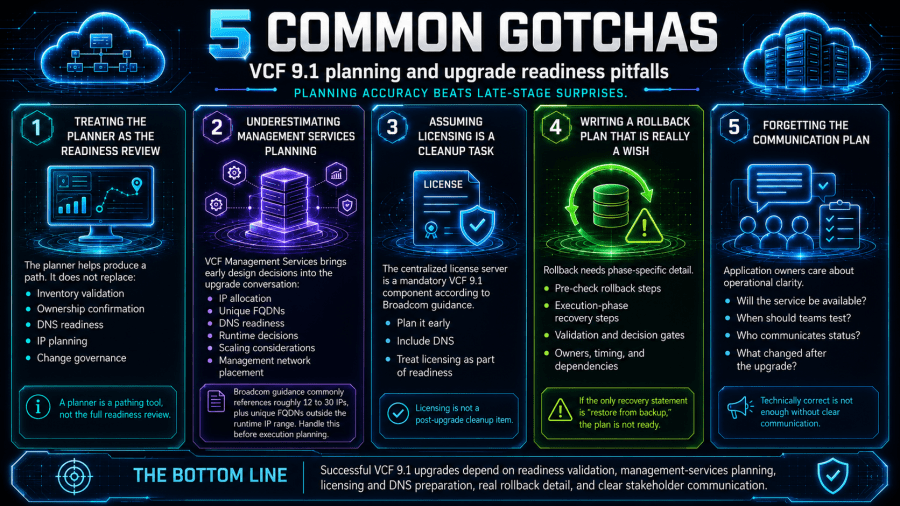
Rollback needs phase-specific detail. If the only recovery statement is “restore from backup,” the plan is not ready.

The following sources were used to validate version-sensitive and product-specific statements in this article. Recheck them before publishing or executing an upgrade, especially if Broadcom updates the VCF 9.1 documentation, upgrade sequence guidance, or known issues.

Symptoms of a Weak Upgrade Plan

Use verified inputs:

Are we ready to produce an upgrade plan that the organization can actually execute?

  • The current inventory is based on memory, not exported evidence.
  • The team knows the vCenter version but not the NSX, VCF Operations, Aria, VxRail, or edge-state dependencies.
  • DNS and reverse DNS ownership is unclear.
  • Management network IP capacity is treated as a future task.
  • The license server is assumed to be “handled later.”
  • The maintenance window is sized around the first click, not the full sequence.
  • Rollback language is vague.
  • Application owners are notified after the technical team has already committed to dates.

You need named owners for:

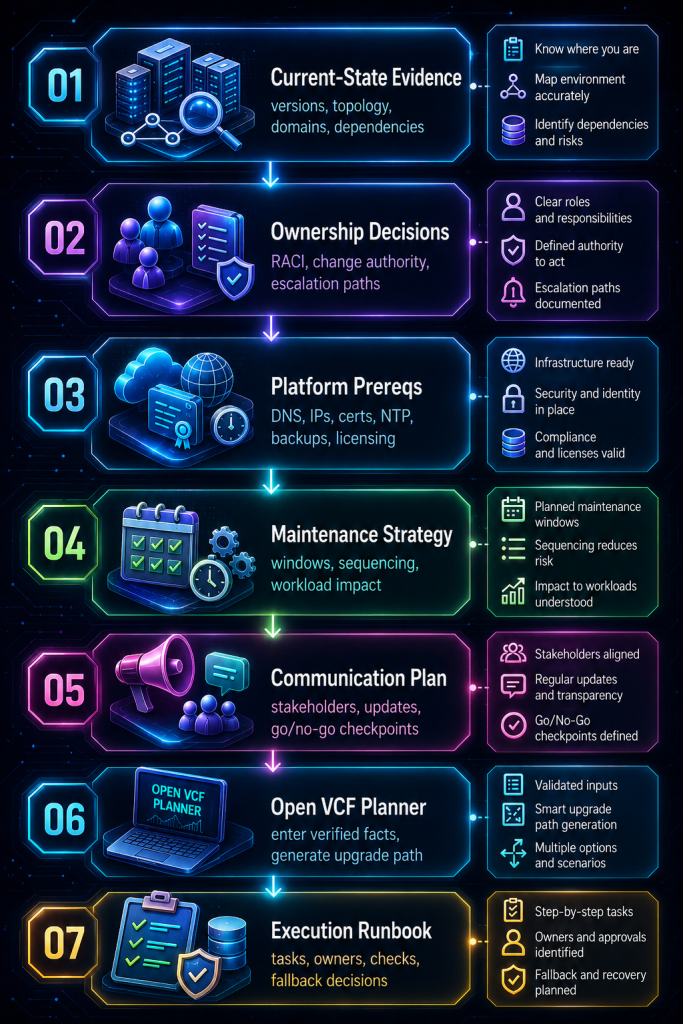
The Readiness Workflow at a Glance

Broadcom’s own 5.2.x to 9.1 guidance recommends validating the path against the interoperability matrix and consulting the VCF 9.1 release notes and hardware compatibility list before proceeding.

The VCF Management Services wizard requires FQDNs for VCF services runtime, fleet components, instance components, Identity Broker, and the License Server. Broadcom’s guidance also states that all FQDNs must resolve to unique IP addresses outside the IP range provided for the VCF services runtime while still being inside the management network.

The communication plan should exist before the technical plan is finalized.

Before you open the planner, make the decisions that matter: define the scope, classify the starting state, assign ownership, understand availability requirements, reserve IPs, prepare DNS, plan licensing, validate backups, phase the maintenance windows, define fallback boundaries, protect workloads, and communicate clearly.

Typical warning signs include:

This is where many upgrade plans become real or fall apart.

Item Required Decision
Management Services IP pool CIDR or range confirmed and reserved
Future scale-out headroom 12 minimum versus 30 maximum decision
Internal runtime overlap Confirm 198.18.0.0/15 does not overlap, or document approved alternative
DNS records Forward and reverse records assigned
FQDN ownership Naming convention approved
Firewall rules Required management paths reviewed
Monitoring New management services added to observability scope

Exit criteria:

Decision: Prepare FQDNs and DNS Records

The team wants to open the VCF Upgrade Planner and start entering versions.

The planner can help generate a tailored upgrade path from your current deployment and version inputs. It asks for the current deployment type, selected products, product versions, and target VCF 9.1 version, including inputs for vCenter, ESX, VCF Operations / Aria Operations, VCF Automation / Aria Automation, NSX, Dell VxRail, and current VCF versions. The tool also notes that vCenter and either ESX or VxRail must be selected to proceed with upgrade paths.

Before the planner session, confirm:

That work belongs to the readiness review.

  • Forward lookup validation.
  • Reverse lookup validation.
  • Lower-case naming convention.
  • No stale records from failed lab attempts.
  • No reuse of existing component FQDNs unless explicitly documented.
  • Clear ownership for emergency DNS changes during the window.

This PowerCLI snippet is not a replacement for SDDC Manager, VCF Operations, the planner, or official upgrade prechecks. It is a lightweight way to capture basic vCenter and host inventory evidence before the readiness review.

Decision: Plan Licensing Before the Window

But the planner cannot decide who owns DNS. It cannot tell you whether the network team has actually reserved the management IPs. It cannot negotiate a change freeze with application owners, decide whether the business accepts a phased maintenance approach, or confirm whether the rollback plan is more than “restore from backup and hope.”

A failed readiness review is not a failure of the project. It is the project avoiding a bad maintenance window.

Every required decision has a named owner and backup owner.

Licensing Question Required Answer
Who owns license entitlement access? Named owner
Where will the license server live? Network, IP, FQDN
Are A and PTR records ready? Confirmed
Is license assignment part of validation? Yes / No
Who handles post-upgrade license alarms? Named owner

That makes licensing a readiness item, not a post-upgrade cleanup task.

Decision: Validate Backups, Snapshots, and Support Bundles

That detail is easy to miss.

“What sequence of maintenance windows gives us the least operational risk while still moving the platform forward?”

  • Backup jobs are current.
  • Restore points are known.
  • Restore method is understood.
  • Component-level snapshot guidance is checked against the official upgrade documentation.
  • Support bundles can be collected.
  • Logs are retained somewhere outside the component being upgraded.
  • The team knows which recovery actions require Broadcom support involvement.

Use three categories:

The VCF Upgrade Planner can help with the product-aware path. It cannot fix those gaps.

Decision: Define the Maintenance Window Strategy

That is valuable.

“If a lifecycle task fails after component upgrade begins, collect logs, preserve task state, and engage support before attempting manual repair.”

The readiness review should define exactly what recovery evidence exists before execution.

If a readiness item fails, do not force the planner session.

Window Purpose
Readiness window Final health checks, backups, DNS validation, binary staging
Management plane window VCF Operations, SDDC Manager, Management Services, licensing
Network/control window NSX management and edge-related work where applicable
Compute window vCenter and ESX host rolling upgrades
Validation window Application smoke testing, monitoring review, cleanup
Deferred workload-domain windows VI domain upgrades or lower-risk phases

The goal is not to predict every failure. The goal is to prevent improvisation.

Decision: Define the Rollback or Fallback Boundary

For each phase, define:

Start with a current-state inventory that can be reviewed by more than one team.

Category Meaning
Retry The task can be safely retried after correcting a known issue
Pause The upgrade can stop at a supported checkpoint while the team investigates
Recover The team must restore, rebuild, or engage support based on documented guidance

Translate the upgrade into windows.

Create a RACI that names actual people, not teams only.

Every upgrade plan needs a fallback model, but the fallback model must be honest.

A good VCF upgrade should feel boring during the maintenance window.

The planner output is not the end of planning. It is the start of execution design.

Decision: Protect Workloads During Platform Work

Exit criteria:

A license server dependency discovered during the execution window is a planning failure.

  • Cluster capacity supports maintenance operations.
  • DRS behavior is understood.
  • Host evacuation assumptions are realistic.
  • NSX Edge placement and failover behavior are reviewed.
  • Backup and replication jobs are not colliding with maintenance windows.
  • Monitoring suppression is scoped, not global.
  • Application owners know when to test.

VCF upgrades cross team boundaries. Treat ownership as a prerequisite, not an afterthought.

Decision: Build the Communication Plan

Use the readiness review as a gate before entering data into the planner. The point is not to slow the project down. The point is to keep the planner from becoming a false sense of readiness.

Only after the readiness artifacts exist should the team open the planner.

Timing Communication
T-minus two weeks Upgrade intent, scope, expected impact, owner contacts
T-minus one week Final window confirmation, application testing expectations
T-minus 24 hours Freeze reminder, escalation bridge, validation schedule
Start of window Execution started, current phase
Phase checkpoints Completed phase, next phase, issues if any
End of window Completion status, known issues, validation request
T-plus one business day Final summary, lessons learned, follow-up tasks

The readiness review is where the upgrade path becomes executable.

Optional Inventory Export Before the Planner Session

Network and DNS prerequisites are reserved, documented, and validated before planner input.

Broadcom’s VCF 9.1 guidance identifies the Centralized VCF License Server as a new mandatory component for VCF and vSphere Foundation environments. It can be installed as a standalone OVA or as part of the installer, and the license server must have DNS A and PTR records.

Runbook Stages

Stage: Freeze the Current-State Facts

Do not guess. If an input is unknown, stop and collect evidence.

Broadcom’s guidance separates upgrade paths based on existing deployment type, including vCenter/ESX-only deployments, vCenter/ESX with Aria Operations or VCF Operations, deployments with NSX, deployments with Aria Automation, VCF 5.2.x or 9.0.x using SDDC Manager, and VCF 9.0.x environments with Fleet Management Appliance or VMware Identity Broker.

  • Product versions and builds.
  • Management domain and workload domain layout.
  • NSX and edge topology.
  • Aria / VCF Operations and Automation presence.
  • VxRail presence, if applicable.
  • Current known issues.
  • Current certificates and expiration dates.
  • Backup status.
  • Monitoring/logging coverage.
  • Support entitlement and case process.

Before that happens, you need a readiness checkpoint that answers a more practical question:

Before that happens, you need a readiness checkpoint that answers a more practical question:

Before that happens, you need a readiness checkpoint that answers a more practical question:

Before that happens, you need a readiness checkpoint that answers a more practical question:

Before that happens, you need a readiness checkpoint that answers a more practical question:

Before that happens, you need a readiness checkpoint that answers a more practical question:

Before that happens, you need a readiness checkpoint that answers a more practical question:

Confirm:

Validation Checklist

VCF Management Services brings IP, FQDN, DNS, runtime, and scaling decisions into the upgrade conversation. Broadcom’s guidance around 12 to 30 IPs, unique FQDNs outside the runtime IP range, and management network placement should be handled before execution planning.

Check Pass Criteria
Inventory Versions and builds exported or confirmed from authoritative systems
Starting state Deployment type documented
Ownership RACI complete
IP plan Management Services IP pool reserved
DNS Forward/reverse records planned and tested where possible
Licensing License server deployment approach documented
Backups Recent backup and restore expectations confirmed
Certificates Expiration and trust paths reviewed
Maintenance windows Phased windows drafted
Communication Stakeholder plan ready
Support path Entitlement and escalation process known
Risk log Open risks assigned

Exit criteria:

Check Pass Criteria
Planner output Saved with date and input assumptions
Source docs Release notes, upgrade docs, KBs, matrix, and HCL reviewed
Exceptions Any unsupported or unclear condition assigned
Runbook Planner steps translated into operational tasks
Go/no-go Decision meeting scheduled with required owners

Fallback Guidance


Common Gotchas

Treating the Planner as the Readiness Review

The upgrade path is not only about versions. It is about control planes, identity, licensing, IP space, lifecycle ownership, communication, and maintenance sequencing.

Failure Action
Unknown product version Stop and collect inventory
Unclear starting state Stop and classify the environment
No IP space Resolve IPAM/network design before planning
DNS owner unavailable Delay planner session
License server plan missing Assign owner and define deployment path
No backup evidence Complete backup validation first
Maintenance window unrealistic Re-phase the change
No application validation owner Do not submit change request
Unsupported path suspected Validate with official docs and support

Broadcom’s guidance explicitly distinguishes multiple starting states and upgrade paths, including cases where independent component upgrades are not the option when NSX is present.

Similar Posts