Broadcom’s October 8, 2026 upgrade guidance confirms that convergence operates on the vCenter instance as a whole. It does not offer arbitrary cluster selection from the existing vCenter.
Then discovery reveals that some hosts are running different Update 3 patch levels. An existing NSX deployment has its own lifecycle requirements. Several clusters still use baseline-based patch management. A storage array depends on a particular driver and firmware combination. The backup platform has not yet been certified for the proposed target.
This is an architectural prerequisite because it determines the future host lifecycle model.
But management compatibility does not guarantee every administrative operation behaves exactly as before.
Start With the Source Environment, Not the Target Version
The implementation plan should identify:
I would not attempt to solve that requirement by assuming the import wizard can select a subset of clusters.
A migration process that finishes within the maintenance window but leaves no time for application testing is poorly planned.
I would evaluate in-place modernization first when the customer has compatible infrastructure, sufficient maintenance capacity, and a healthy vCenter architecture.
Even when they share the same ESXi release family, their supported upgrade methods and required prerequisites may differ significantly.
Establish the actual deployment type
These are material design and execution decisions, not warnings to acknowledge and dismiss.
| Starting environment | Primary planning implication |
|---|---|
| Standalone vCenter and ESXi 8.x | Evaluate eligible VVF upgrade workflows and, where appropriate, VCF adoption |
| vSphere 8.x with vSAN | Add vSAN device, storage policy, health, capacity, and lifecycle validation |
| vSphere 8.x with NSX 4.x | Evaluate the supported VCF Installer convergence workflow rather than independent component upgrades |
| vSphere 8.x with Aria Automation | Account for the automation and identity transition within the applicable VCF adoption workflow |
| Existing VCF 5.2.x | Use the supported VCF lifecycle upgrade path and component sequencing |
| Existing VCF fleet adding vSphere infrastructure | Evaluate the VCF import workflow and its eligibility requirements |
| Hardware refresh or substantial redesign | Evaluate a parallel VVF or VCF deployment with workload migration |
The issue can occur when the VMware Update Manager database was previously reset on affected vCenter 8.0 U3 or 9.0.x releases.
Broadcom KB 440630 identifies both installer-based and standalone-component workflows for applicable vSphere-only environments.
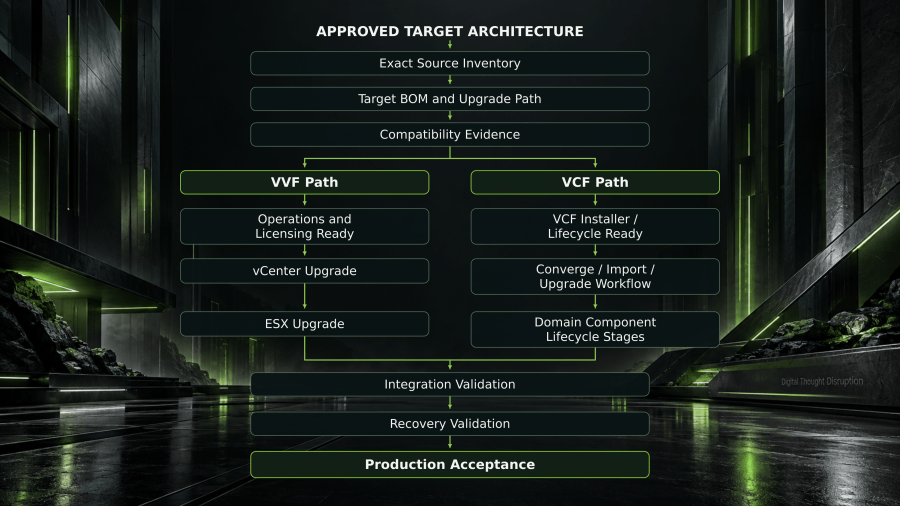
The following conceptual diagram shows how I would structure that reasoning across different VMware transition branches.
I would classify the starting environment before collecting the final component-level requirements.
It now operates under a different management and lifecycle model, but the underlying version 8 software must still be upgraded through a supported subsequent workflow.
Inventory product versions and actual builds
This distinction matters enormously.
The correct migration technology must be selected from the actual source and destination conditions. HCX, cross-vCenter vMotion, replication, backup and restore, or application-native methods are not interchangeable.
| Layer | Required inventory fields |
|---|---|
| vCenter | FQDN, version, build, deployment topology, SSO/ELM state, certificates, plugins |
| ESXi | Host, cluster, version, build, vendor image, CPU, model, boot method |
| Lifecycle | Baseline or image management, desired image, vendor add-ons, firmware integration |
| vSAN | OSA/ESA architecture, devices, health, capacity, resync state, storage policies |
| NSX | Manager and Edge builds, transport nodes, federation, overlay networks, routing, firewall dependencies |
| Operations | Aria/VCF Operations builds, collectors, adapters, automation dependencies |
| Recovery | Backup, replication, disaster recovery, supported versions, restore capabilities |
| Hardware | Server model, BIOS, NIC/HBA, storage controller, firmware and driver versions |
| Commercial | Product entitlements, subscription eligibility, licensing service requirements |
| Workloads | Guest operating systems, passthrough devices, application dependencies, business owners |
The VCF Diagnostic Tool can identify the condition with:
The decision should compare the risk and cost of remediating the source environment against the risk and cost of building and migrating to a separate destination.
Two customers may both report that they are running vSphere 8 Update 3 and still require different transition plans.
Build a Compatibility Matrix That Can Make Decisions
Maintenance estimates need to include preparation, change execution, service validation, failure investigation allowance, and the decision deadline for recovery.
Part 4 will address the final stage of the vSphere 8 exit program: production-wave execution, recovery validation, operational acceptance, exception handling, and Day-2 ownership. That is where the technical transition becomes an accepted production platform.
For workload migrations, the recovery question changes once applications accept new writes or perform external transactions.
The minimum compatibility record
| Field | Purpose |
|---|---|
| Configuration ID | Stable identifier for the component or configuration being assessed |
| Source component | Installed product and component |
| Source release/build | Exact discovered source state |
| Target component | Intended destination product |
| Target release/build | Exact candidate target from the supported BOM |
| Transition method | Upgrade, converge, import, new build, or workload migration |
| Compatibility authority | Broadcom matrix, product documentation, OEM matrix, or partner support statement |
| Validation date | When the compatibility result was checked |
| Status | Supported, blocked, conditional, or unverified |
| Required remediation | Specific prerequisite or alternative action |
| Evidence owner | Person or team responsible for confirmation |
| Closure evidence | Saved matrix result, vendor record, precheck, or approved test |
vSphere Lifecycle Manager (vLCM) baseline management was deprecated in vSphere 8 and removed in the subsequent major release.
I would therefore include a mixed-version validation stage covering:
Neither should be bypassed because the implementation team has already reserved the maintenance window.
Separate five types of compatibility
This approach introduces a separate migration workload, with its own connectivity, data movement, application consistency, scheduling, and recovery requirements.
- Upgrade-path compatibility: Can this exact source release move directly to the specified target release using the proposed workflow?
- Product interoperability: Can the resulting component versions operate together during and after the transition?
- Hardware and driver compatibility: Are the server, CPU, I/O devices, drivers, and firmware supported for the target configuration?
- Architecture eligibility: Does the environment meet the requirements for VVF deployment, VCF convergence, import, or greenfield adoption?
- Ecosystem support: Do backup, storage, recovery, network, guest operating system, GPU, and application vendors support the resulting environment?
The following YAML is a conceptual planning artifact for a hypothetical standalone vSphere customer evaluating VVF 9.1.1.
An upgrade plan should separately identify the systems used to perform and validate the upgrade.
Takeaway: Do not approve a VMware 9.x upgrade because the source and target version numbers look compatible. Approve it when the exact configuration, supported workflow, and recovery path have been demonstrated.
An unsupported source-to-target path may require selecting another maintenance release, completing a prerequisite upgrade, or changing the transition method.
Why Patch Level Can Matter More Than the Major Release
The approved compatibility workbook is a controlled baseline, not a permanent statement of support.
I would also require a documented vCenter and Supervisor backup and recovery plan.
I would not convert an SDDC-managed cluster through an independent vCenter workflow simply because the interface presents an available action.
For an applicable Supervisor or VKS environment targeting an affected vCenter release, the change record must contain proof that the documented database schema validation has passed.
That classification needs to be established before a component sequence can be trusted.
A real example: vSphere 8.0 U3k and VMware 9.1
Suppose an environment receives a security patch for vSphere 8 after a particular VMware 9.1 baseline has been finalized. The updated version 8 component may contain fixes that are absent from that version 9.1 target.
That has an immediate architectural consequence.
| Source | Target | Documented direct upgrade result |
|---|---|---|
| vCenter 8.0 U3k | VVF 9.1.0 | Unsupported |
| vCenter 8.0 U3k | VVF 9.1.1 | Supported |
| vSphere 8.0 U3j/U3k | VCF 9.1.0 convergence | Blocked by documented back-in-time restrictions |
| Eligible vSphere 8.0 U3j/U3k | VCF 9.1.0 import | Supported as an onboarding operation without immediately upgrading the underlying vSphere 8 components |
The sequence must preserve the supported transitions involving management components, lifecycle services, NSX, vCenter, ESX, and any applicable additional products.
The strongest upgrade plan is therefore built from an exact-build compatibility record, not a generic version-to-version sequence.
The customer also has a vSphere Supervisor deployment whose lifecycle database was reset during an earlier troubleshooting incident.
Import is not an upgrade
I would track these as separate milestones:
A report exported several months ago is useful historical evidence, but it cannot establish the state of an environment that has continued receiving security patches.
An existing VCF 5.2.x environment has a different lifecycle path because SDDC Manager already controls the environment.
This is a potentially destructive upgrade failure, not a routine post-upgrade warning.
I would revalidate the compatibility baseline at three points:
- VCF onboarding completed.
- Required VCF management and lifecycle integration validated.
- Imported domain software upgraded to the approved target.
- Production and operational acceptance completed.
A server passing a general hardware compatibility check does not establish that every device inside it is supported.
Do not stop security patching merely to preserve an upgrade path
The technical team should not quietly force an unsupported path to preserve the original project schedule.
I would make this a hard stop condition.
Broadcom KB 455737 documents a potential lifecycle database inconsistency affecting certain vCenter environments running vSphere Supervisor or VMware vSphere Kubernetes Service (VKS).
It is not VMware deployment syntax, does not invoke an upgrade, and does not claim that the example environment has passed validation.
Choose the Supported Transition Branch
Once that record establishes a supported target, the architect can select the correct workflow, define the component dependencies, validate the design in a representative pilot, and authorize production changes through explicit go/no-go gates.
The hardware compatibility review should establish the exact combination rather than checking only the server manufacturer’s marketing model.
Branch A: Standalone vSphere 8 to VVF 9.x
The pilot needs to determine where the last safe reversal point exists, what happens beyond that point, and which team has authority to choose recovery.
This package should connect back to the architecture decision made in Part 2.
The main risk is assuming that because workloads can continue running during certain adoption operations, the transition is architecturally simple.
For example, vCenter may already be at the approved version 9 release while some ESXi hosts remain on version 8 pending maintenance windows.
| Stage | Engineering activity | Required validation |
|---|---|---|
| Source readiness | Reconcile builds, certificates, vCenter topology, plugins, and lifecycle state | Known-good source inventory |
| Platform services | Prepare VCF Operations, license services, DNS, and entitlements | Management and licensing services validated |
| Lifecycle preparation | Establish supported image-based lifecycle configuration | Cluster image and hardware compliance |
| vCenter transition | Execute the supported source-to-target vCenter workflow | Management functionality and integrations validated |
| ESX remediation | Upgrade eligible hosts through controlled cluster procedures | Host, cluster, networking, and storage health |
| Acceptance | Test applications, recovery, monitoring, and ongoing lifecycle operations | Approved target operating state |
That creates a prerequisite for environments still managing clusters through legacy baselines.
A pilot must establish more than whether the upgrade tool finishes.
A green planning dashboard is not enough.
Branch B: Existing vSphere 8 with NSX or Aria Automation to VCF 9.x
I would establish the exact source builds, eligible target BOM, NSX topology, management placement, and VCF convergence requirements before creating any execution steps.
Broadcom’s lifecycle validation can therefore block the transition.
For an enterprise using Dell PowerFlex, for example, I would require separate confirmation of supported ESX builds, PowerFlex client components, storage connectivity, drivers, and Dell’s applicable interoperability guidance.
Some transitions have a documented reversal or recovery procedure. Others require restoring coordinated management components, rebuilding a destination, or performing forward remediation.
- VCF Operations and applicable management services.
- VCF Installer prerequisites and convergence eligibility.
- Existing NSX Manager and Edge topology.
- Network transport, routing, and security policy dependencies.
- Aria Automation and identity integrations when present.
- Host image-based lifecycle readiness.
- Storage and recovery interoperability.
- The approved sequence for importing or converting existing infrastructure.
It needs to translate discovered configurations into actionable engineering dispositions.
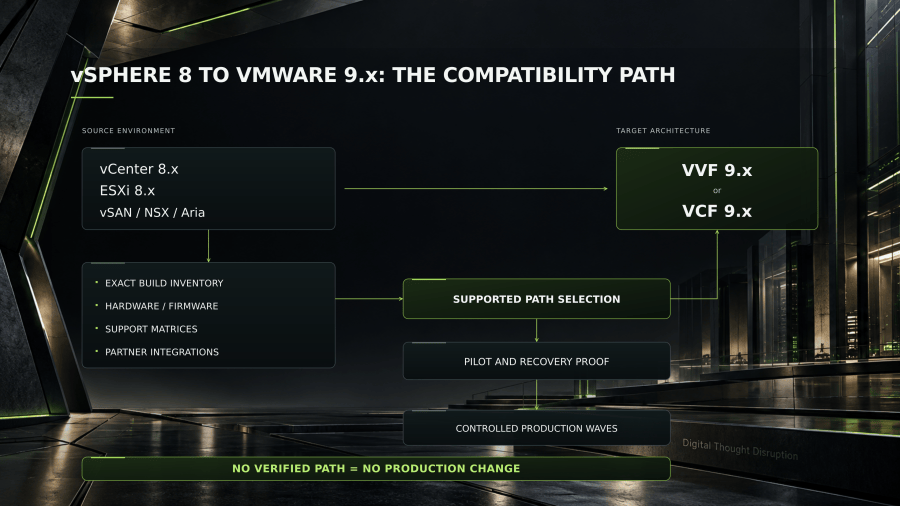
The path from vSphere 8 to VMware 9.x is determined by the actual source environment, the selected VVF or VCF architecture, and the supported relationships between all participating components.
Branch C: Import an eligible vSphere environment into an existing VCF fleet
Every relevant source-to-target relationship should identify the planned destination, the compatibility authority, the evidence captured, and the action required.
One of the most important lessons from VMware’s 2026 release cycle is that a numerically newer major release does not always contain every fix present in a recently patched older release.
The specific vCenter example is:
The vendor specifically calls attention to server certification, CPU generations, I/O controllers, and NVMe storage devices.
The initial plan looks straightforward. Upgrade management components, update vCenter, remediate ESXi hosts, validate the environment, and move forward.
I would require explicit approval gates between technical planning and production execution.
For qualifying VCF 5.2.x and 9.0.x environments, Broadcom KB 440630 requires VCF Operations and the supported VCF lifecycle workflows rather than an independently orchestrated ESX and vCenter upgrade.
Branch D: Existing VCF 5.2.x to VCF 9.x
Broadcom’s vCenter 9.1 architecture guidance explains that vCenter is upgraded before ESX and that virtual hardware compatibility is designed to support transitional hosting on eligible older ESX versions.
When a vendor publishes a relevant correction, the project should be able to identify which approved waves are affected.
One might have standalone vCenter and ESXi clusters with conventional networking and external storage.
I would treat those as design prerequisites, not discoveries to make during installation.
Customers already operating VMware Cloud Foundation need a different implementation model.
Branch E: New VVF or VCF deployment with workload migration
Management ownership, network control, licensing, lifecycle, and recovery responsibilities can all change even when no application disk is relocated.
A vCenter backup does not by itself prove that NSX, Supervisor, automation, and workload recovery dependencies can all be returned to a consistent state.
In Part 1, we established the 2027 modernization program and the need to finish production work before the support deadline. Part 2 introduced the customer decision workshop for selecting VVF or VCF based on actual requirements, operating responsibilities, and cost.
An unresolved Supervisor database inconsistency requires the supported validation and remediation procedure before an affected upgrade.
It should also confirm whether the selected build is still an appropriate destination based on current advisories, known issues, and support status.
Moving from VMware vSphere 8.x to VMware vSphere Foundation (VVF) 9.x or VMware Cloud Foundation (VCF) 9.x requires more than selecting a target release. The supported transition depends on exact vCenter and ESXi builds, NSX and vSAN dependencies, management architecture, server hardware, firmware, drivers, lifecycle management, licensing, recovery integrations, and the selected deployment method.
Convert the Selected Path into a Dependency Graph
The engineering plan should therefore cover:
The import plan must also establish the future lifecycle path. Onboarding infrastructure into VCF does not automatically complete the component upgrades required for the target release.
For the 2027 transition program, I would consider this phase complete only when the organization has an approved BOM, a supported path, credible recovery procedures, validated pilot evidence, and a production execution plan that can be defended by the engineering teams responsible for operating the result.
For VCF 9.1, Broadcom documents mandatory VCF Management Services, including lifecycle functionality. The centralized VCF License Server is also required for VCF and VVF environments.
Broadcom KB 441187 also documents version 9 licensing-capacity considerations for ESXi 8 hosts managed during a mixed-version period.
One particularly important October 2026 advisory shows why compatibility review must include more than versions and feature support.
These are not optional administrative conveniences.
A qualifying vSphere 8 environment may be imported into an existing VCF fleet while its vCenter and ESXi components remain on supported version 8 builds.
I would not use the first production cluster as the experiment that proves the architecture.
A failed gate should trigger an explicit engineering response.
Reconcile image-based lifecycle management
Continue reading
The inventory must include exact release and build information, not just marketing names.
The output is an approved candidate bill of materials (BOM), not simply a choice of “version 9.1.”
Get Paul Bryant’s practical guides to enterprise AI, hybrid platforms, and day-2 operations by email. New articles as they publish. Unsubscribe anytime.
I would not use a whitepaper validated for one VCF 9.0 configuration as evidence that a different VCF 9.1.1 configuration is supported.
The pilot should also measure actual execution time.
- Which clusters still use baselines.
- Which clusters already use vLCM images.
- The intended ESX base image and approved vendor add-ons.
- Firmware and driver compatibility.
- Whether the required image transition can be completed before the target upgrade.
- How compliance and remediation will be validated afterward.
For interoperability and upgrade-path review, I would explicitly include patch releases rather than accepting a filtered major-version view. Broadcom KB 450972 specifically instructs administrators to uncheck “Hide Patch Releases” when investigating back-in-time restrictions.
The Hardware Compatibility Gate Must Be Independent
If the lifecycle services, software depot, license server, DNS, identity, or certificate dependencies are unavailable, an otherwise healthy environment may be unable to complete the planned change.
Any of those changes can affect the planned path.
Greenfield becomes attractive when the source architecture cannot meet the target prerequisites without substantial remediation.
Nor does it validate every attached storage array or backup product.
| Compatibility area | Required verification |
|---|---|
| Physical server | Model and configuration certified for the exact target ESX release |
| Processor | Supported CPU generation and relevant feature restrictions |
| BIOS and firmware | Approved OEM baseline for the target ESX release |
| Network adapters | NIC device support, driver, firmware, and required features |
| Storage adapters | HBA/controller driver and firmware alignment |
| Boot devices | Supported boot media and configuration |
| External storage | Array code, protocol, multipathing, VASA/VAAI integrations where applicable |
| vSAN | Certified hardware, device firmware, disk configuration, storage architecture |
| Accelerators | GPU model, passthrough or vGPU stack, guest driver and runtime compatibility |
Broadcom KB 455737 provides the official checker and remediation procedures.
Broadcom KB 385617 provides the supported SDDC Manager-based process for qualifying VCF versions.
Broadcom KB 440630 explicitly differentiates these starting conditions.
For applicable VCF Management Services deployments, Broadcom KB 440630 specifies an initial minimum of 12 management-network IP addresses, with additional addresses supporting expansion. It also documents a default internal service range of 198.18.0.0/15 that must be checked for overlap, with documented alternatives where necessary.
Broadcom KB 448135 subsequently confirms that VCF 9.1.1 incorporates newer component builds addressing the documented 9.1.0.x back-in-time restrictions.
Add a Mandatory Supervisor and VKS Pre-Upgrade Gate
Broadcom refers to this as a back-in-time upgrade condition.
The plan should account for:
Unsupported hardware may require procurement or a parallel deployment.
The pilot should test the actual transition method, preferably against a representative subset of the customer’s infrastructure.
Someone opens an upgrade planning tool and enters vSphere 8 Update 3.
How I would handle it in the plan
After the transition method is selected, I would stop thinking of the implementation as a flat task list.
A hold means the issue can potentially be remediated without abandoning the intended architecture. A stop means the proposed execution path is not acceptable in its current form.
If the compatibility assessment reveals that the approved target cannot be delivered within the available budget or support deadline, the correct outcome is to reopen that decision.
The table combines the specific guidance in Broadcom KB 454369 and KB 450972. It is not a universal compatibility guarantee for every component in an integrated environment.
Between architecture approval and implementation, a customer may install another security patch, upgrade a storage array, replace a host, change a backup product, or adopt a new target maintenance release.
The final compatibility assessment must reconcile discovery exports with the live environment before the upgrade plan is approved.
Broadcom KB 454369 documents how security updates associated with VMSA-2026-0006.1 affect upgrade eligibility.
The primary authorities should include Broadcom’s Product Interoperability Matrix, Broadcom Compatibility Guide, exact product release notes, the applicable VCF/VVF documentation, and OEM or partner support matrices.
Broadcom’s 9.1 guidance distinguishes standalone vSphere upgrades, VCF Installer convergence, import into an existing VCF environment, and upgrades of existing SDDC Manager-managed VCF deployments. These workflows are not interchangeable. The 2026 back-in-time upgrade restrictions also demonstrate why a release number such as “8.0 Update 3” does not establish upgrade eligibility. Some vSphere 8 source builds cannot move directly to VCF or VVF 9.1.0, even though documented paths exist to 9.1.1.
Upgrading directly could reintroduce vulnerabilities or defects.
Plan the Mixed-Version Interval Explicitly
That coexistence period must be included in the interoperability and licensing plan.
Import is appropriate to evaluate when the customer already operates a VCF environment and wants to onboard another qualifying vSphere instance as a workload domain.
By the end of this engineering phase, I would expect the following package.
If only some clusters should become a VCF workload domain, the customer may need to redesign vCenter boundaries or deploy a new vCenter and move workloads before onboarding.
The expected coexistence state must be documented before the first component changes.
For example, a host might be supported by ESX 9.x while its current storage adapter requires a firmware upgrade. A vCenter-to-ESX version combination might be interoperable while a direct upgrade between two specific builds is blocked.
An unhealthy vSAN cluster may require remediation and capacity recovery before host maintenance.
The same reasoning applies to VxRail, Fibre Channel arrays, GPU-backed workloads, and other tightly integrated platforms.
- vCenter management of remaining ESXi 8 hosts.
- HA and Distributed Resource Scheduler functionality.
- vMotion and storage mobility requirements.
- Host maintenance mode and evacuation.
- License assignment and available subscription capacity.
- Backup and monitoring integrations.
- Cluster configuration changes required during the transition.
Broadcom KB 322186 documents the transition to image-based lifecycle management. For SDDC Manager-managed environments, the applicable transition workflow must respect the VCF release requirements.
What originally looked like a routine software upgrade is now a collection of interdependent engineering decisions.
Turn the Compatibility Workbook into a Machine-Readable Contract
A compatibility workbook should not simply contain hundreds of rows of hardware and software inventory.
An environment with NSX 4.x or Aria Automation dependencies cannot simply be treated as a collection of unrelated products to upgrade individually.
apiVersion: planning.dtd/v1
kind: VMwareTransitionContract
metadata:
name: vsphere8-to-vvf91
baselineDate: “2026-10-26”
status: assessment
spec:
source:
deploymentType: standalone-vsphere
vcenter:
release: “8.0 U3k”
exactBuildVerified: false
esxHosts:
releaseFamily: “8.0 U3”
individualBuildsVerified: false
nsxPresent: false
supervisorPresent: false
vLCMMode: mixed
hardwareValidation: pending
target:
platform: VVF
releaseCandidate: “9.1.1”
implementationMethod: in-place-evaluation
targetBOMApproved: false
requiredEvidence:
– source-build-inventory
– product-upgrade-path-results
– product-interoperability-results
– hardware-compatibility-results
– storage-and-driver-support
– license-entitlement-validation
– image-lifecycle-readiness
– management-backup-validation
– application-and-recovery-test-plan
blockingConditions:
– unsupported-source-target-path
– unapproved-target-bom
– incompatible-hardware
– unresolved-licensing
– failed-critical-prechecks
– untested-recovery-procedure
pilot:
approved: false
cluster: not-selected
applicationTest: pending
recoveryTest: pending
execution:
productionAuthorized: false
changeAuthority: platform-change-board
stopDecisionOwner: technical-change-lead
The correct response is to evaluate a newer supported target, determine whether another documented transition method is appropriate, or establish a formally approved short-term exception.
The revalidation should check both sides: source configuration drift and new target release guidance.
This third article addresses the next engineering problem: How do we prove that an existing vSphere 8 environment can reach its approved VMware 9.x target through a supported, recoverable sequence?
The final implementation plan should be revalidated immediately before execution because security advisories and maintenance releases can change the supported paths between initial planning and the production window.
The operator must not proceed until the documented validation and any required remediation have been completed, followed by verification of a valid schema.
It should not automatically approve a change because someone populated every field with a positive value.
This is a dependency planning model. It is not permission to bypass installer workflows or change the vendor-prescribed sequence.
Validate the Proposed Sequence Through a Representative Pilot
The starting architecture determines which options are credible. The exact builds and deployment prerequisites determine which are actually available.
The organization should maintain a traceable record of the compatibility results used for each production wave.
The candidate target is 9.1.1, but the contract does not claim that every host or integrated product supports it.
| Pilot test | What must be demonstrated |
|---|---|
| Compatibility prechecks | No unresolved blocking conditions for the selected source and target |
| Management upgrade | vCenter, APIs, identity, certificates, and relevant plugins function |
| Host lifecycle | Image compliance, maintenance mode, evacuation, and remediation complete |
| Networking | Required VLAN, vDS, NSX, routing, DNS, and security paths remain operational |
| Storage | Device paths, data access, storage policies, and vSAN health remain acceptable |
| Workload behavior | Representative business applications pass defined functional tests |
| Backup and restoration | A representative protected workload can be restored successfully |
| Disaster recovery | Applicable replication and recovery workflows remain usable |
| Monitoring and automation | Alerts, logs, scripts, and connected services operate against the new environment |
| Failure handling | The team can recognize stop conditions and execute the documented recovery path |
Once the source state and target BOM have been established, I would identify the supported implementation branch.
Broadcom KB 443586 confirms that hardware supported on ESXi 8 is not automatically supported on ESX 9.
A spreadsheet is useful for human review, but the approved planning decisions can also be expressed in structured data.
Do not confuse rollback with restoring a prior state
For a basic vCenter and ESX environment without NSX or Aria Automation, the guidance describes both installer-based and standalone-component approaches for qualifying destinations.
Stay informed
A failed recovery test may require a revised protection design before application migration.
I would build the technical transition around a source-to-target compatibility workbook, an approved deployment branch, a release-specific dependency sequence, and a representative pilot. Every production wave must have validated prerequisites, stop conditions, recovery procedures, and recorded acceptance evidence.
The operating principle is simple: prove the path before executing the change, and preserve the evidence that makes the resulting environment supportable.
Establish Production Go/No-Go Gates
Security, architecture, and platform operations should make that decision together.
That does not mean the imported workload domain has completed its transition to version 9.
Consider a VMware customer that has completed its infrastructure modernization assessment.
| Gate | Pass condition | Stop or hold condition |
|---|---|---|
| Source baseline | Exact component and build inventory reconciled | Unknown builds or unapproved source drift |
| Target BOM | Supported target and component combinations approved | Unsupported path or incomplete interoperability evidence |
| Hardware | Required certification and OEM support validated | Unsupported host, device, firmware, or driver |
| Management | VCF/VVF operations, DNS, identity, licensing and lifecycle services ready | Blocking management dependency or failed precheck |
| Supervisor/VKS | Required schema and protection checks completed | Applicable unresolved KB 455737 condition |
| Recovery | Approved restoration or recovery procedure with sufficient evidence | No credible recovery method for the proposed change |
| Capacity | Host evacuation and storage headroom validated | Insufficient capacity or degraded storage health |
| Pilot | Representative technical and application tests accepted | Unresolved critical pilot defect |
| Production authorization | Window, owners, communications, and decision conditions approved | Missing acceptance or unresolved high-risk dependency |
An existing VCF 5.2.4 environment, for example, encountered specific back-in-time restrictions with VCF 9.1.0. That historical restriction should be evaluated against the current target release and interoperability results rather than assumed to apply to every subsequent patch release.
A task list tells the operator what to do.
That makes 9.1.1 a reasonable evaluation target for affected environments, but the selected BOM and exact combination must still be verified.
What I would do when a gate fails
The planning boundary is the existing vCenter environment.
A useful automation process could reject a production authorization when required fields remain incomplete or a hard gate has failed.
The first mistake I would prevent is treating every vSphere 8 environment as equivalent.
This is precisely why I would separate architecture selection from technical transition design.
I would collect at least the following:
Broadcom KB 440630 documents VCF Installer convergence workflows for those starting conditions and explicitly distinguishes them from the standalone-component path.
This path is a reasonable candidate when the customer has selected VVF, its existing infrastructure is supported, and it does not require a fundamental management redesign.
Keep the Compatibility Plan Current Until the Change Window
A parallel VVF deployment can still be preferable when hardware is being replaced, source management is unhealthy, or stronger separation between old and new environments is required.
An environment running vSphere 8 Update 3 cannot be assumed eligible for every VMware 9.1 release or adoption workflow. Patch-level restrictions, hardware compatibility, NSX and Aria dependencies, lifecycle management, licensing, Supervisor state, and partner products can fundamentally change the implementation method.
This allows engineering teams to compare planned states, track exceptions, and establish consistent pre-implementation gates.
Broadcom KB 457944 describes the recovery process for affected environments where Supervisor Control Plane VMs have already disappeared after upgrade. That process can involve returning to the prior vCenter state, restoring the Supervisor, correcting the underlying database inconsistency, and repeating the upgrade.
- When the target BOM and implementation architecture are approved.
- Before the pilot begins.
- Immediately before the applicable production change window.
I would also capture the date and source of each record.
Many enterprise upgrades spend some time with different component versions coexisting.
The guidance uses Broadcom documentation available as of October 26, 2026, including the VCF/VVF 9.1 release family and 9.1.1 compatibility updates. It is a technical planning framework, not an exact command sequence for an unidentified customer environment. No specific customer’s builds, infrastructure, subscriptions, or recovery capabilities have been validated.
The other might have vCenter, ESXi, vSAN, NSX 4.x, Aria Operations, Aria Automation, HCX, recovery orchestration, and independent storage and network integrations.
What the Upgrade Architect Should Deliver
A temporary version mixture is not a problem merely because it is mixed. It becomes a problem when that specific combination is unsupported or when its operational restrictions have not been planned.
| Artifact | What it establishes |
|---|---|
| Exact-build inventory | The actual source state across VMware and dependent systems |
| Compatibility and interoperability workbook | Evidence that each required source-to-target combination is supported |
| Approved target BOM | The intended software, hardware, firmware, and driver configuration |
| Transition-method decision | Why upgrade, convergence, import, or parallel migration is appropriate |
| Component dependency plan | The supported sequence and prerequisites for the actual deployment type |
| Pilot validation report | What was tested, results, defects, recovery observations, and limitations |
| Production execution framework | Wave boundaries, prerequisites, owners, change conditions, and evidence expectations |
| Exception register | Remaining unsupported or unvalidated conditions, accountable owners, and disposition |
An exact-build compatibility workbook also needs release-specific advisories and environmental history. An earlier troubleshooting action can materially change whether a future upgrade is safe.
An imported domain remaining on version 8 must not be accidentally reported as compliant with the 2027 exit objective.
Typical reasons include incompatible hardware, inappropriate vCenter boundaries, unsupported device configurations, significant storage redesign, or a need for management-plane isolation.
Conclusion
The operational lesson is broader than this one defect.
Under those conditions, an upgrade to vCenter 9.1.0 or 9.1.1 can result in Supervisor Control Plane virtual machines and associated Foundation Load Balancers being removed.
The detailed execution-day control model belongs in the change runbook, but the pilot must establish its technical feasibility.
An organization should not routinely delay important security patches because its preferred target release has a compatibility restriction.
An existing VCF deployment should never be reclassified as ordinary standalone vSphere just because its workloads run on familiar ESXi clusters.
For the standalone-component approach, the documented high-level dependency pattern includes VCF Operations, the centralized license server, eligible entitlements, vCenter, and ESX hosts.
These are different compatibility claims.