TL;DR
- Converting disks is not the finish line. Your real goal is a new steady state:
- no unmanaged disks
- no lingering storage account VHD costs
- guardrails that prevent reintroduction
- Cleanup is measurable FinOps value: remove unattached disks and old VHD blobs after your validation period.
- Governance is your long-term win: use Azure Policy to audit VMs that do not use managed disks and surface drift continuously.
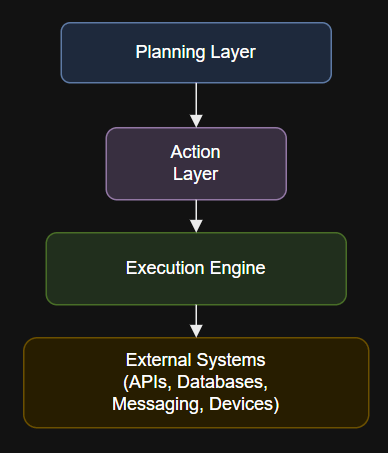
Architecture Diagram
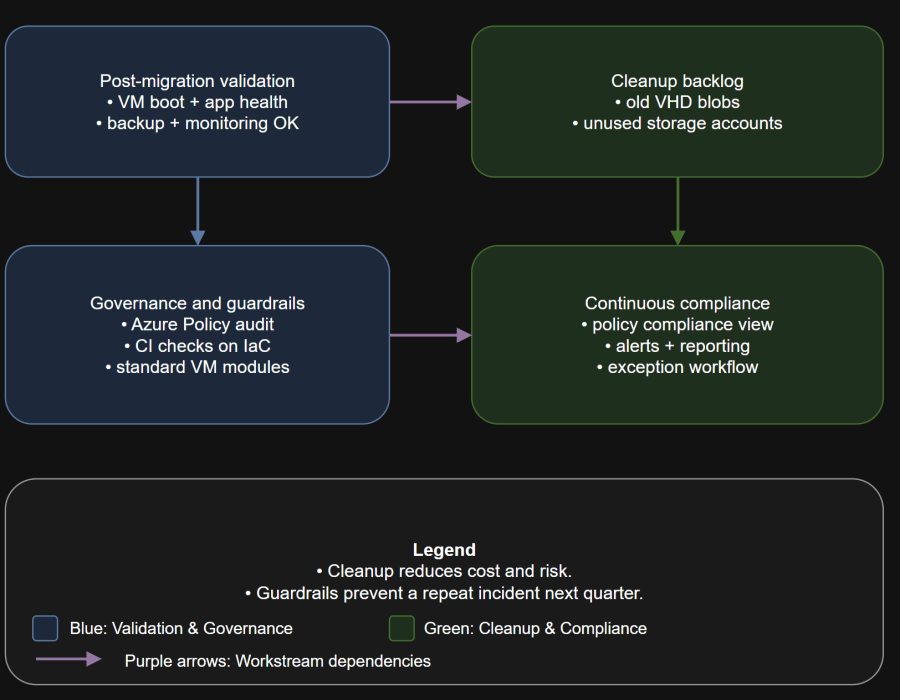
Table of Contents
- Scenario
- What “Done” Looks Like
- Operational Runbook Snapshot
- Cleanup Workflow
- Governance Controls
- Anti-patterns
- Day-two Operations
- Best Practices
- Conclusion
Scenario
Controls to add:
Operator workflow:
- original VHD blobs still exist and cost money
- orphaned disks accumulate over time
- a team deploys a legacy template and reintroduces unmanaged disks
- your compliance posture report doesn’t catch any of it until an audit
Example with Azure CLI:
What “Done” Looks Like
Operator workflow:
- Inventory shows zero unmanaged-disk VMs across all subscriptions.
- Old VHD artifacts have a documented retention period and then are deleted.
- You have a policy posture:
- audit unmanaged disk usage
- track exceptions with an expiration date
- Your IaC and pipelines cannot accidentally recreate unmanaged disks.
Operational Runbook Snapshot
Migration avoids an outage, but governance prevents a repeat. Clean up the old artifacts, enforce managed disks with policy, and put guardrails into your delivery pipelines so unmanaged disks cannot reappear.
- Cloud platform team: backlog, tooling, policy, reporting
- App owners: validation sign-off and maintenance windows
- Security/FinOps: governance requirements and cleanup approval
Policy assignment options:
- validate
- cleanup
- enforce guardrails
- monitor drift and exceptions
Cleanup Workflow
Cleanup objective
# List managed disks that are not attached to any VM
az disk list –query “[?managedBy==null].[name,resourceGroup,location,id]” -o table
Unmanaged disks cleanup
Keep your deletion workflow conservative:
Design-time prevention is stronger than day-two detection.
- list unattached managed disks
- confirm retention requirements
- delete with approval
Design-time prevention is stronger than day-two detection.
- identify storage accounts that hosted VHDs
- locate unlocked VHD blobs after conversion
- delete after validation period and approval
You’ve migrated your VMs to managed disks. The outage risk is reduced.
- snapshot or export evidence if required by your org
- perform deletes in small batches
- document exactly what was removed
Governance Controls
Azure Policy: audit unmanaged disk usage
This post is about making “managed disks everywhere” the default, not a one-time project.
- Assign the built-in policy Audit VMs that do not use managed disks at the subscription or management group scope.
- Integrate non-compliance reporting into your operations cadence.
Reduce cost and remove latent risk:
- portal assignment
- IaC assignment (Terraform/Bicep)
- CLI/PowerShell in a platform pipeline
CI guardrails in IaC
Then the quiet problems show up:
Find and delete unattached Azure managed and unmanaged disks (Azure portal): https://learn.microsoft.com/en-us/azure/virtual-machines/disks-find-unattached-portal
Find and delete unattached Azure managed and unmanaged disks using PowerShell: https://learn.microsoft.com/en-us/azure/virtual-machines/windows/find-unattached-disks
Migrate your Azure unmanaged disks by March 31, 2026: https://learn.microsoft.com/en-us/azure/virtual-machines/unmanaged-disks-deprecation
Azure virtual machine recommended policies (includes Audit VMs that do not use managed disks): https://learn.microsoft.com/en-us/azure/governance/policy/concepts/recommended-policies
Built-in policy definitions for Azure Virtual Machines: https://learn.microsoft.com/en-us/azure/virtual-machines/policy-reference
Frequently asked questions about disks: https://learn.microsoft.com/en-us/azure/virtual-machines/faq-for-disks
- module standards: disallow VM disk definitions that reference storage account VHD URIs
- pipeline tests:
- policy-as-code checks
- template validation
- peer review gates for compute changes
Exception workflow
Roles:
- time-boxed exceptions only
- business owner sign-off
- remediation plan tracked like any other change
Anti-patterns
- “We’ll migrate later” without an owner and a date.
- Converting production without verifying IP dependencies.
- Leaving old VHD blobs forever because “storage is cheap.”
- Fixing production manually but not updating IaC, guaranteeing drift and repeat work.
- Treating policy audit as optional telemetry instead of an operational control.
Day-two Operations
Your steady-state routines:
- Weekly inventory report of unmanaged disk usage (should be empty).
- Monthly cleanup run for unattached managed disks.
- Quarterly review of exceptions and removals.
- Post-incident check: any restored VM should land on managed disks.
Best Practices
- Build a “golden path”:
- managed disks by default
- backup enabled by default
- policy assignment at management group
- Measure outcomes:
- number of unmanaged-disk VMs reduced to zero
- storage cost reduction from cleanup
- reduction in operational toil by removing storage account management
Conclusion
A managed disk can be unattached but still billable.
Sources
You will find edge cases. Handle them without creating permanent risk: