TL;DR
Identity is not a “later” decision. It is a boundary decision.
- The hierarchy you should standardize on is Fleet -> Instance -> Domain -> Cluster.
- Your topology decision is mostly about:
- How many instances you deploy and how they map to sites and regions.
- How many fleets you operate as governance, identity, and operational boundary lines.
- Three practical deployment postures:
- Single site: fastest path, smallest blast radius, simplest networking.
- Two sites in one region: stretched clusters, stronger site resilience, tighter latency constraints.
- Multi-region: multiple instances, DR-oriented operating model, more dependencies and more change control.
- VCF 9.0 GA code levels referenced in this post (component set and build numbers):
- SDDC Manager 9.0.0.0 build 24703748
- vCenter 9.0.0.0 build 24755230
- ESX 9.0.0.0 build 24755229
- NSX 9.0.0.0 build 24733065
- VCF Operations 9.0.0.0 build 24695812
- VCF Automation 9.0.0.0 build 24701403
- VCF Identity Broker 9.0.0.0 build 24695128
- Note: the BOM for this release also calls out VCF Installer 9.0.1.0 build 24962180 as required to deploy all VCF 9.0.0.0 components.
Architecture Diagram
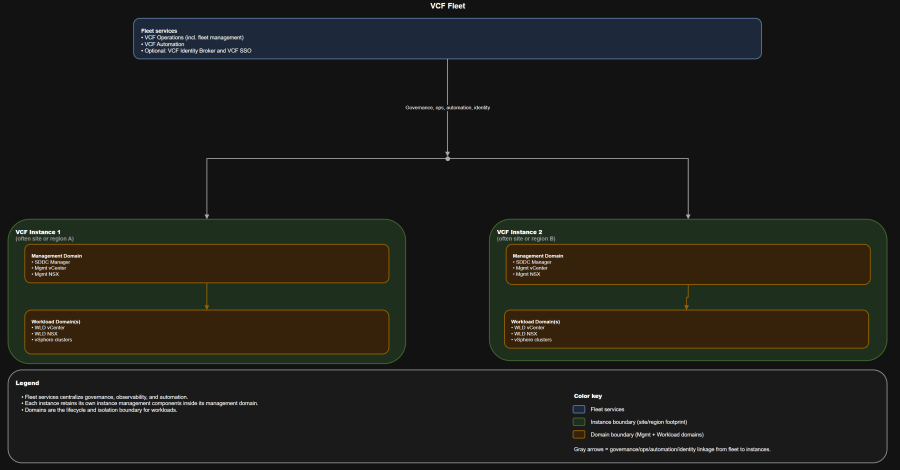
Table of Contents
- Scenario
- Scope and version alignment
- Core concepts: mapping physical topology to fleets and instances
- Decision criteria you should agree on up front
- Challenge: choose your deployment posture
- Architecture tradeoff matrix
- One private cloud vs multiple fleets
- Identity and SSO boundary patterns
- Failure domain analysis
- Day-0, day-1, day-2 map by topology
- Who owns what
- Operational runbook snapshot
- Troubleshooting workflow
- Anti-patterns
- Best practices
- Summary and takeaways
- Conclusion
Scenario
These are real-world starting points, not vendor commitments:
- What VCF is actually managing.
- Where you draw governance boundaries vs infrastructure boundaries.
- What changes when you move from a single site to stretched sites to multiple regions.
- How identity scope and fleet count become day-0 decisions with long tail operational consequences.
Scope and version alignment
Use this in design boards to stop circular debates.
- VCF 9.0.0.0 GA terminology and workflows.
- Greenfield deployment using VCF Installer.
- You deploy both VCF Operations and VCF Automation from day-1, even if you phase consumption later.
Version compatibility matrix
What it looks like
| Component | Version | Build |
|---|---|---|
| SDDC Manager | 9.0.0.0 | 24703748 |
| vCenter | 9.0.0.0 | 24755230 |
| ESX | 9.0.0.0 | 24755229 |
| NSX | 9.0.0.0 | 24733065 |
| VCF Operations | 9.0.0.0 | 24695812 |
| VCF Automation | 9.0.0.0 | 24701403 |
| VCF Identity Broker | 9.0.0.0 | 24695128 |
| VCF Installer | 9.0.1.0 | 24962180 |
Core concepts: mapping physical topology to fleets and instances
The physical words that matter
You need a model that matches your org and compliance posture.
- Site: your contained fault domain boundary. Power, cooling, ToR switches, upstream routing, and physical security usually correlate here.
- Region: one or more sites within synchronous replication latencies. Crossing regions is typically a disaster recovery process, not an HA event.
The VCF objects you should use in every design discussion
- Fleet: your shared governance and shared platform services boundary. This is where you centralize fleet services like operations and automation.
- Instance: a discrete VCF deployment footprint. Each instance contains its own management domain and workload domains.
- Domain: the lifecycle and isolation boundary. You patch and evolve domains independently.
- Management domain: hosts instance management components.
- VI workload domain(s): run consumer workloads.
Avoid these early and you remove a lot of future toil.
- If someone says “we need another vCenter,” you force the conversation back to domain and instance.
- If someone says “we need separation,” you ask whether they mean governance separation (fleet) or workload isolation (domain).
Decision criteria you should agree on up front
Practical rule:
Design-time decision criteria
- Availability objective
- Host failure only
- Rack failure
- Site or availability zone failure
- Region failure
- Latency and network fabric capability
- ESX host to ESX host latency within clusters
- Stretched VLAN and L2 adjacency requirements
- Fleet-wide connectivity constraints between instances
- Isolation objective
- Logical isolation only
- Physical isolation by cluster or domain
- Regulated tenant isolation that requires separate identity and change control
- Operating model maturity
- Do you have a platform team that can own fleet services and identity lifecycle?
- Do you have standardized change windows and patch discipline?
Day-2 reality check questions
- Can you support fleet services as shared dependencies?
- Can you operationalize backup schedules, certificate lifecycle, and password rotation consistently?
- Can you troubleshoot cross-site failures without escalating everything to vendors?
Challenge: choose your deployment posture
Treat “private cloud” as your organizational wrapper. VCF objects start at fleet.
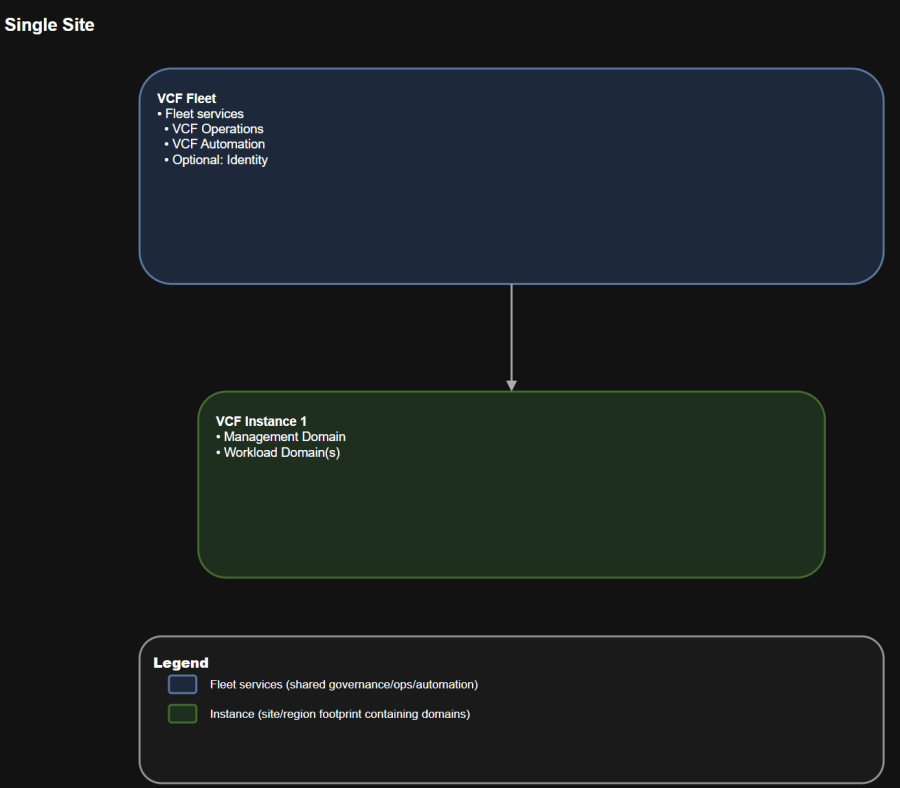
Solution A: Single site
Use this to prevent “everyone owns it, so no one owns it.”
Operational implications
- One fleet
- One instance
- One management domain
- One or more workload domains
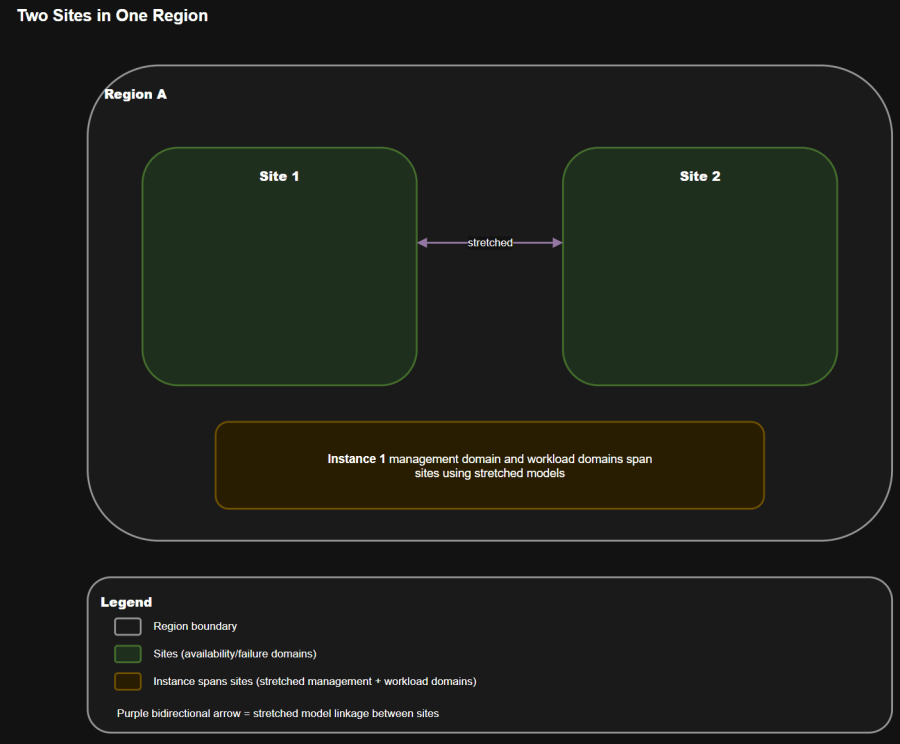
Operational implications
- One fleet
- One instance stretched across two sites in the same region
- A management domain designed for high availability across the two sites
- Workload domains separated from management
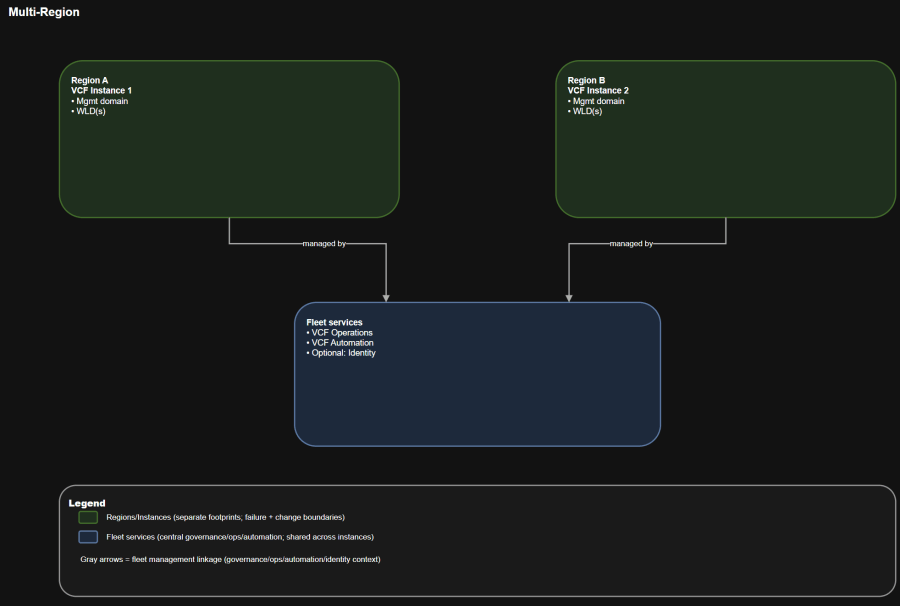
Operational implications
- One fleet
- Multiple instances
- Each instance has its own management domain and workload domains
- Regions are connected with a cross-region network for centralized management and visibility
This is the “site resilience” posture. It usually assumes stretched constructs and tighter network constraints.
- Separate failure domains by region.
- Enable recovery workflows that survive region-level events, given adequate capacity and replication strategy.
This is where topology turns into real operational outcomes.
- You introduce an explicit dependency chain:
- Fleet services live somewhere (commonly the first instance), and other instances rely on cross-region connectivity to reach them.
- Change control becomes multi-region by default:
- Certificates, identity, and patching must be coordinated across locations.
Architecture tradeoff matrix
Design intent
| Attribute | Single site | Two sites in one region | Multi-region |
|---|---|---|---|
| Primary goal | Simplicity | Site resilience | Region separation and DR posture |
| Typical instance count | 1 | 1 | 2+ |
| Network complexity | Low | High | Medium to high |
| Latency sensitivity | Moderate | High | Medium |
| Fleet service dependency | Local | Local but stretched | Cross-region dependency |
| Operational overhead | Low | High | High |
| Cost drivers | Host count, storage | Stretched fabric, witness, failover capacity | Duplicate capacity, replication, bandwidth |
Cost model snapshot
Use UI and workflow validation before you declare success:
- Single site
- Cheapest fleet service hosting footprint.
- Lowest network engineering cost.
- Two sites in one region
- You pay for:
- Higher-quality inter-site links
- Stretched VLAN support
- Additional failover capacity (because you are engineering for a site loss)
- You pay for:
- Multi-region
- You pay for:
- Duplicate management footprints per region
- Data replication and orchestration tooling
- Higher operational toil unless you automate day-2 heavily
- You pay for:
One private cloud vs multiple fleets
Design intent
When one fleet is enough
Design intent
- You want centralized observability and automation.
- You can accept shared governance services across multiple instances.
- You want a standard operating model across locations.
When you should operate multiple fleets
Operational reality:
- Separate identity providers or separate SSO boundaries for regulated isolation.
- Independent change windows and patch schedules.
- Hard blast radius separation for fleet services.
Use this when:
- Fleet separation is about governance, identity scope, and shared service blast radius.
- Domain separation is about workload isolation and lifecycle independence.
Identity and SSO boundary patterns
Choose one fleet when:
Challenge: unify access or isolate tenants
Use this when:
Solution A: Fleet-wide SSO
You will hear these terms used casually. Align them to your constraints:
- You want one set of credentials and SSO across all components in the fleet.
- You can tolerate that an identity broker impact affects the fleet.
You will hear these terms used casually. Align them to your constraints:
- You want shared identity across a subset of instances, not necessarily all.
- You want more control over blast radius than a single fleet-wide configuration.
Solution C: Single instance SSO boundaries
You will hear these terms used casually. Align them to your constraints:
- You need regulated or tenant isolation.
- You need different identity providers or different authentication policies per instance.
- You want to localize identity outages.
Embedded vs appliance identity broker
VMware Cloud Foundation 9.0 and later Documentation: https://techdocs.broadcom.com/us/en/vmware-cis/vcf/vcf-9-0-and-later/9-0.html
- Embedded identity broker is simpler but inherits dependency on instance components.
- Appliance identity broker adds overhead but improves availability and scale.
- Design constraint worth calling out: there is a maximum number of instances that can connect to a single identity broker deployment.
Failure domain analysis
Use this as your “what are we talking about” anchor in architecture reviews and CAB meetings.
Failure domains you should model
| Failure | What breaks | What keeps running | Typical owner response |
|---|---|---|---|
| Fleet services unavailable | Central observability, centralized automation, fleet management workflows, and optionally SSO experience | Existing workloads and instance-level management planes continue to run | Platform team restores fleet services, validates integrations |
| Instance management domain impaired | Domain lifecycle actions, some instance operations | Workloads may still run, but you lose safe lifecycle control and may lose some vCenter or NSX management functions depending on the failure | VI admin + platform team coordinate recovery |
| Workload domain impaired | Workloads in that domain | Other domains and instances continue | VI admin + app teams execute workload recovery runbooks |
Practical RTO and RPO examples you can use as starting targets
If you cannot state these targets, you should at least agree on the priority order:
- Fleet services (VCF Operations, VCF Automation, identity broker)
- RTO: 2 to 8 hours depending on how automated your restore is
- RPO: 24 hours is a common baseline when backups are daily
- Instance management domain components
- RTO: 1 to 4 hours if you have clean backups and documented restore procedures
- RPO: 24 hours baseline, tighter if you replicate critical config
- Workload domains and applications
- RTO and RPO are application-specific and often require orchestration tooling
Operational implications
- Identity and authentication
- SDDC Manager and lifecycle
- vCenter and NSX management
- Workload recovery
Day-0, day-1, day-2 map by topology
Day-0: decisions you should lock
You are about to deploy VCF 9.0 GA greenfield and you need a shared language for:
- Fleet count and naming standard.
- Instance to site or region mapping.
- Domain strategy:
- Management domain is not where you run business workloads.
- Workload domains align to lifecycle and isolation needs.
- Network and IP plan:
- Treat subnet sizing as irreversible planning, not something you “fix later”.
- Allocate address space with room for expansion.
- Identity model:
- Fleet-wide vs instance-level boundaries.
- Corporate IdP integration and MFA policy alignment.
- Certificate authority and certificate lifecycle plan.
- Backup targets and backup schedule owners.
Day-1: bring-up sequence that fits the object model
What it looks like
- Deploy VCF Installer appliance.
- Start new fleet deployment and create the first instance.
- License and stand up fleet services:
- VCF Operations
- VCF Automation
- Deploy identity broker and configure VCF SSO with your directory.
- Create workload domain(s) and establish network connectivity patterns.
- Stand up VCF Automation constructs for consumption.
Day-2: operations you should operationalize early
- Patch and lifecycle:
- Domain-based upgrades and maintenance windows.
- Explicit rollback plans when upgrading shared fleet services.
- Backup and restore:
- SFTP backup targets for management components.
- Backup schedules for fleet services and for instance components.
- Security lifecycle:
- Password rotation and account management.
- Certificate replacement and renewal.
- Expansion:
- Add workload domains, clusters, and potentially additional instances.
Who owns what
These are design-time decisions that are expensive to reverse later.
| Capability | Platform team | VI admin | App and platform teams |
|---|---|---|---|
| Fleet services lifecycle | Own | Consult | Informed |
| VCF Operations configuration and alerts | Own | Consult | Informed |
| VCF Automation provider setup | Own | Consult | Informed |
| Identity broker and SSO model | Own | Consult | Informed |
| Instance bring-up and health | Own | Own | Informed |
| SDDC Manager operations | Consult | Own | Informed |
| vCenter and NSX in management domain | Consult | Own | Informed |
| Workload domain creation and lifecycle | Consult | Own | Informed |
| Workload provisioning via automation | Own the platform | Consult | Own consumption |
| Application deployment and runtime | Informed | Consult | Own |
Operational runbook snapshot
When something breaks, troubleshoot by boundary.
Weekly
- Review fleet service health and integrations.
- Validate that all instances are reporting metrics and logs.
- Confirm certificate expiration windows and rotation queue.
Monthly
- Execute backup restore tests for:
- Fleet services
- Instance management components
- Review capacity and “failover capacity” assumptions for your topology.
Quarterly
- Patch at domain boundaries, not by ad hoc component upgrades.
- Re-validate cross-site network latency and packet loss.
- Run a tabletop exercise:
- Fleet services outage
- Instance outage
- Site outage
Validation checklist
Hard constraints you must respect
- In VCF Operations, confirm each VCF instance is visible and healthy.
- Confirm your automation provider and tenant access paths work with the chosen identity model.
- Confirm backups are running and stored off the platform.
Troubleshooting workflow
This is not pricing. It is what actually moves your bill of materials.
- Provisioning failures
- Check VCF Automation health and its integration to VCF Operations.
- Validate identity provider connectivity and token issuance.
- Validate network connectivity between fleet services and target instance.
- Instance lifecycle failures
- Inspect SDDC Manager alarms and recent change history.
- Validate domain health and vCenter availability.
- Check for drift from out-of-band changes.
- Cross-site weirdness
- Start with latency and MTU validation.
- Validate gateway HA behavior for stretched segments.
- Confirm site affinity rules for critical components.
Anti-patterns
This is your default starting posture unless you have a clear availability driver.
- Treating a two-site stretched design like “just two data centers”.
- Using a single fleet across regulated tenants when you actually need separate identity and change boundaries.
- Running meaningful workloads in the management domain because it was “available”.
- Designing IP space too tightly and assuming you can resize later.
- Assuming multi-region means “active-active” without defining replication, orchestration, and capacity for failover.
Best practices
- Standardize vocabulary in writing:
- Fleet -> Instance -> Domain -> Cluster
- Keep fleet services highly available and backed up like any other Tier 0 platform.
- Make identity a design board item, not an implementation checkbox.
- Use domains as your lifecycle boundary:
- Patch domains, validate domains, roll back at domain boundaries.
- Write failure-mode runbooks for:
- Fleet services down
- Instance down
- Site down
- Region down
Summary and takeaways
- Your topology posture is an operating model decision, not just an architecture diagram.
- Two sites in one region usually increases availability but also increases network and day-2 complexity.
- Multi-region usually improves fault domain separation, but it introduces cross-region dependencies for fleet services unless you deliberately isolate with multiple fleets.
- Decide identity scope and fleet count at day-0. The cost of changing later is always higher than the cost of deciding carefully now.
Conclusion
These apply to all topologies:
Sources
If you want architects, operators, and leadership aligned, you need a topology mental model that starts with VCF objects and only then maps to your physical sites.