TL;DR
Practical implication: if fleet services are impaired, governance and workflows degrade, but the instance-level control planes do not magically disappear.
That shared mental model is what lets you scale without scaling confusion.
- Fleet-level services: centralized operations, lifecycle for management components, automation, and SSO integration.
- Instance management planes: SDDC Manager, management vCenter, management NSX, plus the vCenter and NSX that belong to each workload domain.
Solutions:
- VCF Installer: 9.0.1.0 build 24962180 (required to deploy VCF 9.0.0.0 components)
- SDDC Manager: 9.0.0.0 build 24703748
- vCenter: 9.0.0.0 build 24755230
- ESXi: 9.0.0.0 build 24755229
- NSX: 9.0.0.0 build 24733065
- VCF Operations: 9.0.0.0 build 24695812
- VCF Operations fleet management: 9.0.0.0 build 24695816
- VCF Automation: 9.0.0.0 build 24701403
- VCF Identity Broker: 9.0.0.0 build 24695128
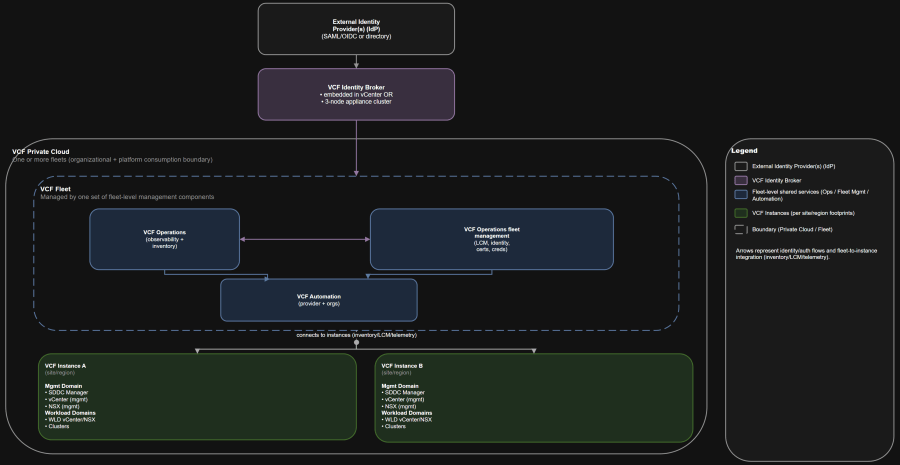
Architecture Diagram
Solutions:
- Fleet-level management components give you centralized governance, inventory, and services.
- Instance management planes are not shared. Each instance still owns its own SDDC Manager, vCenter, and NSX boundaries.
Table of Contents
- Scenario
- Assumptions
- Core vocabulary recap
- Core concept: separate fleet services from instance management planes
- What runs where in VCF 9.0 GA
- Who owns what
- Day-0, day-1, day-2 map
- Identity and SSO boundaries that actually matter
- Topology patterns for single site, two sites, and multi-region
- Failure domain analysis
- Operational runbook snapshot
- Anti-patterns
- Summary and takeaways
- Conclusion
Scenario
You need architects, operators, and leadership to agree on:
- What VCF 9.0 actually manages.
- What is centralized at fleet level vs isolated per instance or domain.
- Who owns which parts of lifecycle, identity, and day-2 operations.
Assumptions
- You are deploying greenfield VCF 9.0 GA (core components at 9.0.0.0, deployed via the documented installer level).
- You deploy both VCF Operations and VCF Automation from day-1.
- You want patterns for:
- Single site
- Two sites in one region
- Multi-region
- You need guidance for both:
- Shared identity
- Separate identity and SSO boundaries for regulated isolation
Core vocabulary recap
B) Cross-instance SSO with multiple Identity Brokers in one fleet
- VCF private cloud: the highest-level management and consumption boundary; can contain one or more fleets.
- VCF fleet: managed by one set of fleet-level management components (notably VCF Operations and VCF Automation); contains one or more instances.
- VCF instance: a discrete VCF deployment containing a management domain and optionally workload domains.
- VCF domain: a lifecycle and isolation boundary inside an instance (management domain and VI workload domains).
- vSphere cluster: where ESXi capacity lives; clusters exist inside domains.
Core concept: separate fleet services from instance management planes
Within the management domain that hosts fleet services, a typical shutdown sequence starts with:
Use this PowerShell example with PowerCLI to validate vCenter and ESXi versions:
Fleet services
If a workload domain’s vCenter or NSX is degraded:
- VCF Operations: inventory, observability, and the console where centralized lifecycle and identity workflows surface.
- VCF Operations fleet management appliance: lifecycle management operations for the fleet management components.
- VCF Automation: self-service consumption, organization constructs, and automation.
- VCF Identity Broker + VCF Single Sign-On: centralized authentication configuration across components (with important exclusions).
Instead, run this mental separation:
Instance management planes
This matters because VCF 9.0 pushes more workflows into a centralized console, but it does not eliminate domain-level responsibilities.
- SDDC Manager
- Management domain vCenter
- Management domain NSX
VCF 9.0 becomes dramatically easier to operate when everyone can point to the same boundaries:
Domain-level control planes
Design-time decisions that are expensive to change later:
- Its own vCenter
- Its own NSX Manager (dedicated per domain, or shared depending on design)
What runs where in VCF 9.0 GA
In multi-instance environments:
- The management domain of the first instance hosts the fleet-level management components (VCF Operations and VCF Automation).
- Additional instances still have their own instance-level management components (SDDC Manager, vCenter, NSX), and may deploy collectors as needed.
Bring-up and initial enablement:
- VCF Operations fleet management is treated as a first-class appliance and should be protected with vSphere HA in the default management cluster.
- VCF Single Sign-On can provide one-login access for many components, but not SDDC Manager and not ESXi.
Who owns what
Key operational detail:
| Component or capability | Platform team (VCF) | VI admin (domains and clusters) | App and platform teams |
|---|---|---|---|
| Fleet bring-up (VCF Installer, fleet creation) | Own | Consult | Inform |
| Fleet-level management components (VCF Operations, fleet management appliance, VCF Automation) | Own | Consult | Inform |
| VCF Identity Broker and VCF Single Sign-On configuration | Own | Consult | Inform |
| SDDC Manager (per instance) | Own (platform governance) | Own day-2 execution | Inform |
| Management domain vCenter and NSX | Shared | Own | Inform |
| Workload domain lifecycle (create domain, add clusters, remediate hosts) | Shared | Own | Inform |
| Workload consumption (Org structure, projects, templates, quotas, policies) | Shared (guardrails) | Consult | Own |
| Backup and restore for fleet management components | Own | Consult | Inform |
| Backup and restore for instance components (SDDC Manager, vCenter, NSX) | Shared (standards) | Own | Inform |
| Day-2 password lifecycle (rotation, remediation) | Own (policy + tooling) | Shared | Inform |
| Certificates and trust (CA integration, renewal cadence) | Own | Shared | Inform |
| DR plans for management components and identity | Own | Consult | Inform |
| DR plans for workload domains and applications | Shared (platform) | Shared (infra) | Own |
This table is meant to stop “that’s not my job” loops during incidents and upgrades.
- Platform team owns the fleet services and guardrails.
- VI admins own domain lifecycle execution and capacity.
- App teams own how they consume resources and what SLAs they require.
Day-0, day-1, day-2 map
VCF Single Sign-On is designed to streamline access across multiple VCF components with one authentication source configured from the VCF Operations console.
Day-0
This is where most “core infrastructure lifecycle” actually executes.
- How many fleets you need (governance and isolation boundary).
- How many instances you need (location and operational boundary).
- Identity design:
- VCF Identity Broker deployment mode (embedded vs appliance).
- SSO scope (single instance vs cross-instance vs fleet-wide).
- Shared vs separate IdPs and SSO boundaries.
- Network and IP plan:
- Subnet sizing for growth matters because changing subnet masks for infrastructure networks is not supported.
- Decide whether fleet-level components share the management VM network or get a dedicated network or NSX-backed segment.
- Management domain sizing:
- Management domains must be sized to host the management components plus future workload domain growth.
- Lifecycle blast radius strategy:
- How you segment domains, instances, and fleets to control upgrade and incident scope.
Day-1
A) Single site with minimal footprint
- Deploy the VCF Installer appliance, download binaries, and start a new VCF fleet deployment.
- Bring up the first instance and its management domain.
- Deploy the fleet-level management components (VCF Operations, fleet management appliance, VCF Automation).
- Deploy VCF Identity Broker (often appliance mode for multi-instance SSO scenarios) and configure VCF Single Sign-On.
- Create initial workload domains, and connect them into VCF Automation as needed.
Day-2
This is the conversation leadership actually needs.
- Lifecycle management:
- Management component lifecycle through VCF Operations fleet management.
- Cluster lifecycle through vSphere lifecycle tooling, with VCF coordinating.
- Identity operations:
- Adding components and instances into SSO scope.
- Re-assigning roles and permissions inside vCenter and NSX after SSO configuration changes.
- Security hygiene:
- Password rotation and remediation flows.
- Certificate replacement with CA-signed certs across both management components and instance components.
- Platform resilience:
- Backup scheduling to an SFTP target for management components and instance components.
- Shutdown and startup runbooks that preserve authentication and cluster integrity.
Identity and SSO boundaries that actually matter
What VCF Single Sign-On does (and does not)
These are the things you deploy once per fleet to provide centralized capabilities:
You should treat SFTP backup targets as day-1 prerequisites, not an afterthought.
- It supports SSO across components like vCenter, NSX, VCF Operations, VCF Automation, and other VCF management components.
- It explicitly excludes SDDC Manager and ESXi, which means you still need local access patterns and break-glass workflows for those systems.
Identity pillars in VCF
Ownership rule of thumb:
- External IdP (SAML/OIDC or directory)
- VCF Identity Broker (brokers authentication and maintains SSO tokens)
- VCF Single Sign-On (centralized authentication configuration and user management)
Use these terms consistently in meetings, designs, and runbooks:
- Each VCF Identity Broker is configured with a single identity provider.
VCF Identity Broker deployment modes
C) Separate fleets for regulated isolation
| Decision point | Embedded (vCenter service) | Appliance (3-node cluster) |
|---|---|---|
| Where it runs | Inside management domain vCenter | Stand-alone appliances deployed via VCF Operations fleet management |
| Multi-instance recommendation | One per instance | Up to five instances per Identity Broker appliance |
| Availability characteristics | Risk of being tied to mgmt vCenter availability | Designed for higher availability; handles node failure |
| Typical fit | Single instance, simpler environments | Multi-instance, larger environments, stronger availability targets |
Quick comparison:
Challenge: You need shared identity for convenience, but regulated isolation for some tenants
Your identity design is built on three pillars:
Your identity design is built on three pillars:
Two other details matter for design reviews:
- Best when you need to start small and accept tighter fault domains.
- Typical posture:
- Single fleet, single instance.
- Management components and workloads can be co-located in one cluster for footprint reduction.
- Operational reality:
- You are trading physical failure-domain isolation for speed and cost.
- Plan early if you intend to adopt organization models in VCF Automation that require additional clusters.
Change management warning: moving from appliance to embedded mode requires resetting the VCF Single Sign-On configuration and re-adding users and groups. Treat the deployment mode decision as day-0.
- Region in VCF terms is multiple sites within synchronous replication latencies.
- Typical posture:
- Single fleet, single instance.
- Stretched clusters across the two sites for higher availability.
- A dedicated workload domain for workloads, with management components protected in the management domain cluster.
- Day-2 consequences:
- You are now dependent on stretched network and storage behaviors for management plane availability.
- You must design first-hop gateway resilience across availability zones for stretched segments.
Your fastest path to org alignment is separating two things people constantly mix up:
- Typical posture:
- Single fleet, multiple instances (at least one per region or per major site).
- Fleet-level management components run in the management domain of the first instance.
- Additional instances bring their own management domain control planes.
- Practical design statement:
- Recovery between regions is a disaster recovery process. Do not confuse “multi-region” with “active-active without DR work”.
Each workload domain is its own lifecycle and isolation boundary, typically with:
| Topology | Fleet count | Instance count | Typical SSO scope | Primary operational risk |
|---|---|---|---|---|
| Single site | 1 | 1 | Single instance or fleet-wide | Small fault domain, tight coupling |
| Two sites, one region | 1 | 1 | Fleet-wide (common) | Stretched dependencies for management availability |
| Multi-region | 1+ | 2+ | Cross-instance or fleet-wide | Governance dependency on where fleet services run |
Failure domain analysis
# Connect to vCenter
Connect-VIServer -Server <vcenter_fqdn>
# vCenter build and version
$about = (Get-View ServiceInstance).Content.About
[PSCustomObject]@{
Product = $about.FullName
Version = $about.Version
Build = $about.Build
}
# ESXi hosts build and version
Get-VMHost | Sort-Object Name | Select-Object Name, Version, Build
Anti-patterns
A clean greenfield deployment is intentionally opinionated:
- You lose or degrade centralized lifecycle workflows, automation workflows, and centralized observability.
- Instance control planes still exist, but day-2 operations may become more manual.
Operational gotcha:
- Users from external identity providers cannot authenticate.
- You must fall back to local accounts for subsequent operations until Identity Broker is restored.
Instance management domain failure
# On the SDDC Manager appliance
sudo lookup_passwords
Fast validation: confirm build levels in your environment
Here’s the practical decision point.
- Workloads in that domain take the blast radius.
- Other workload domains in other instances are unaffected.
Example RTO/RPO targets you can start with
C) Multi-region
- Fleet services (VCF Operations, fleet management, VCF Automation):
- RTO: 4 hours
- RPO: 24 hours (aligned to daily backups)
- Identity Broker:
- RTO: 1 to 2 hours
- RPO: 24 hours (align to backup cadence, plus local break-glass accounts)
- Instance management domain:
- RTO: 2 to 4 hours
- RPO: 24 hours
- Workload domain:
- Driven by application SLAs and data replication strategy
Operational runbook snapshot
Shutdown order matters
B) Two sites in one region
- Shut down instances that do not run VCF Operations and VCF Automation first.
- The instance running the fleet-level management components should be last.
You get clean operations when you stop trying to force everything into a single “management plane” blob.
- VCF Automation
- VCF Operations
- VCF Identity Broker
- Instance management components (NSX, vCenter, SDDC Manager)
- ESXi hosts
Legend:
- Taking the VCF Operations cluster offline can take significant time. Plan your maintenance windows accordingly.
Backups: get the SFTP target right early
A) Shared enterprise IdP with fleet-wide SSO
- Configure SFTP settings for VCF management components.
- Configure backup schedules for VCF Operations and VCF Automation.
- Configure backup schedules for SDDC Manager, NSX Manager, and vCenter at the instance level.
Password lifecycle: know which system is authoritative
- You can change passwords for many local users through VCF Operations.
- Some password expiration and status information is updated on a schedule; real-time status often requires checking at the instance source (SDDC Manager and related APIs).
- You can retrieve default passwords from SDDC Manager using the
lookup_passwordscommand on the appliance.
Important constraint:
Scope and code levels referenced (VCF 9.0 GA core):
If VCF Identity Broker is down:
If VCF Operations, fleet management, or VCF Automation are impaired:
- Treating fleet and instance as synonyms
- Fleet is centralized governance and services.
- Instance is a discrete VI footprint with its own management domain.
- Designing SSO as if SDDC Manager participates
- It does not. Plan break-glass access and operational runbooks accordingly.
- Choosing embedded Identity Broker for multi-instance and then being surprised by availability coupling
- If multi-instance SSO matters, appliance mode is commonly the safer default.
- Using one fleet for regulated tenants without validating identity and governance blast radius
- Separate fleets remain the cleanest isolation boundary when governance separation is required.
- Under-sizing management domains
- Fleet services and management components are not free. You will scale them and patch them like any other production system.
Summary and takeaways
- Use the official construct hierarchy to keep conversations consistent: private cloud -> fleet -> instance -> domains -> clusters.
- Fleet-level management components centralize governance, but they do not collapse instance control planes into a single shared management plane.
- Identity design is a day-0 decision. Choose Identity Broker deployment mode and SSO scope intentionally.
- Align topology to operations:
- Single site is about speed and footprint.
- Two-site in one region is about availability with stretched dependencies.
- Multi-region is about DR posture and multiple instance management planes.
Conclusion
Every instance retains its own control plane boundaries:
- Fleet boundaries for centralized services and governance.
- Instance boundaries for discrete infrastructure footprints.
- Domain boundaries for lifecycle and workload isolation.
VMware Cloud Foundation 9.0 Documentation (VCF 9.0 and later): https://techdocs.broadcom.com/us/en/vmware-cis/vcf/vcf-9-0-and-later/9-0.html
Sources
If an instance management domain is down: