How I Fixed A Failed VCF Managed Services Platform Deployment
October 15, 2026
How I Fixed A Failed VCF Managed Services Platform Deployment
TL;DR
Desired vs current state, and both match. The spec asked for 3 control plane nodes and 1 worker, and that’s exactly what was deployed. The question is why it asked for 3.
If an older runtime with the same FQDN existed before, clean up Fleet first with KB 441333. More on that in part 2.
But the deploy spec in SDDC Manager’s domainmanager.log shows the request was small_ha, which means 3 control plane nodes:
root@photonvm [ ~ ]# export KUBECONFIG=/etc/kubernetes/admin.conf
root@photonvm [ ~ ]# kubectl get pods -A | grep -vE 'Running|Completed'
NAMESPACE NAME READY STATUS RESTARTS AGE
vmsp-platform vsp-install-gozximgflfatpc4pzdtz2dmshq-bootstrap-execute-script-47505123 0/2 Error 0 13h
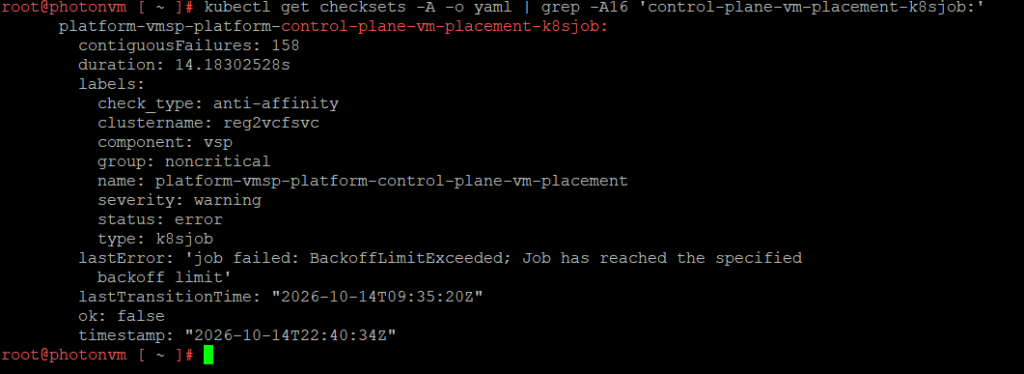
Identifying The Failing Check
kubectl get kcp,machinedeployments -A

Related
kubectl get checksets -A -o json | python3 -c 'import sys,json; [print(k, "| failures:", v.get("contiguousFailures"), "|", v.get("lastError","")) for i in json.load(sys.stdin)["items"] for k,v in i.get("status",{}).get("checkStatuses",{}).items() if not v.get("ok")]'
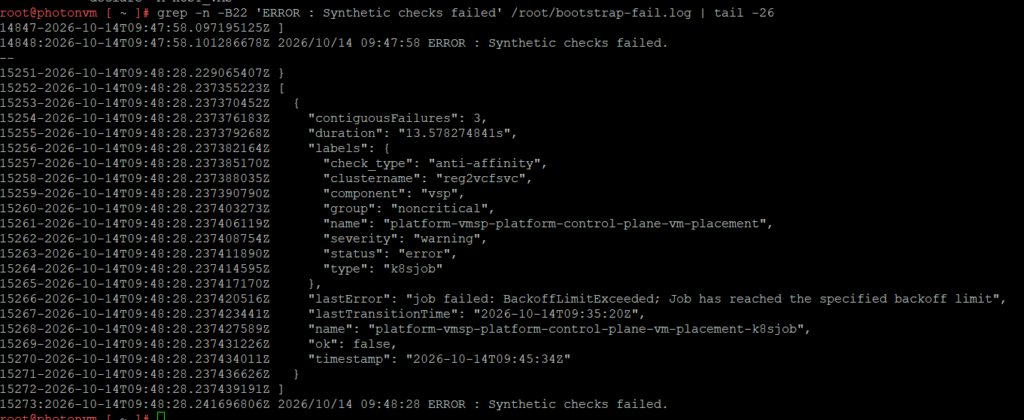
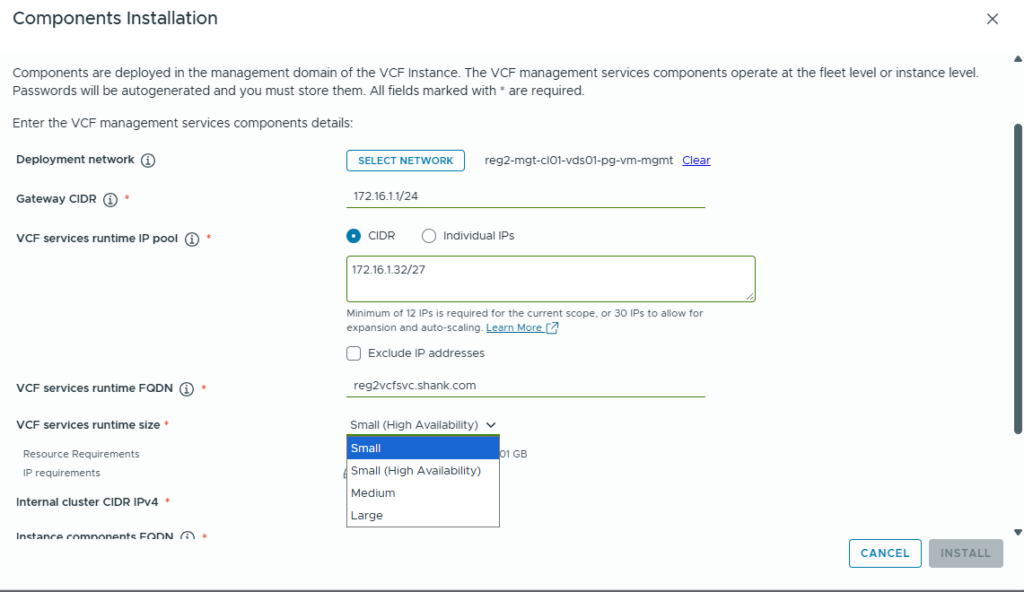
VCF 9.1.1, 2-host management cluster. Redeploying the VCF Management Services Platform (VMSP), shown in the UI as VCF services runtime, kept failing at HEALTH0002 … Synthetic checks failed [VCFMS-BOOTSTRAP-999]. The real cause was a single anti-affinity check. I had picked Small (High Availability) in the wizard, which builds 3 control plane nodes, and 3 control plane nodes can’t be spread across 2 hosts. Redeploying as Small fixed it.
The bootstrap VM also holds the kubeconfig for the new VMSP cluster in /data/vmsp/. Point kubectl at it, otherwise you’ll only ever see photonvm:
Wizard choiceDeploy spec3 CP nodesHEALTH0002Small (HA)size: small_haon 2 hostsplacement checkClean upRedeploy1 CP nodeBootstrap OKSDDC Mgr + VMsSmall1 workerchecks passThe obvious first stop is domainmanager.log on SDDC Manager. It only repeats the generic message. The detailed installer log never makes it back to SDDC Manager, because the upload itself fails with kubectl: Argument list too long.
Clean Up VMSP
When deploying VMSP, especially in a resource-restricted or lab environment, you may hit HEALTH0002 … Synthetic checks failed [VCFMS-BOOTSTRAP-999]. In my case it was the HA size, which deploys 3 control plane nodes. After the cluster is built, a synthetic health check confirms each control plane VM sits on its own ESXi host. With only 2 hosts that can’t be satisfied, so the bootstrap fails.
KB 445132 – reset SDDC Manager so Install Components is available again
Delete the runtime VMs and the bootstrap VM in vCenter
KB 447187 – clean up VCF Operations, only if Ops still lists the runtime under internal/components
This time I made sure I selected Small, no HA!
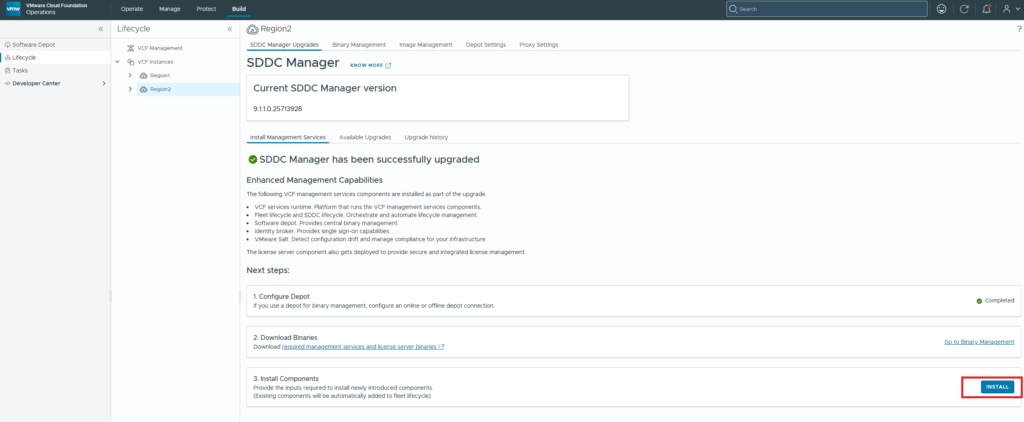
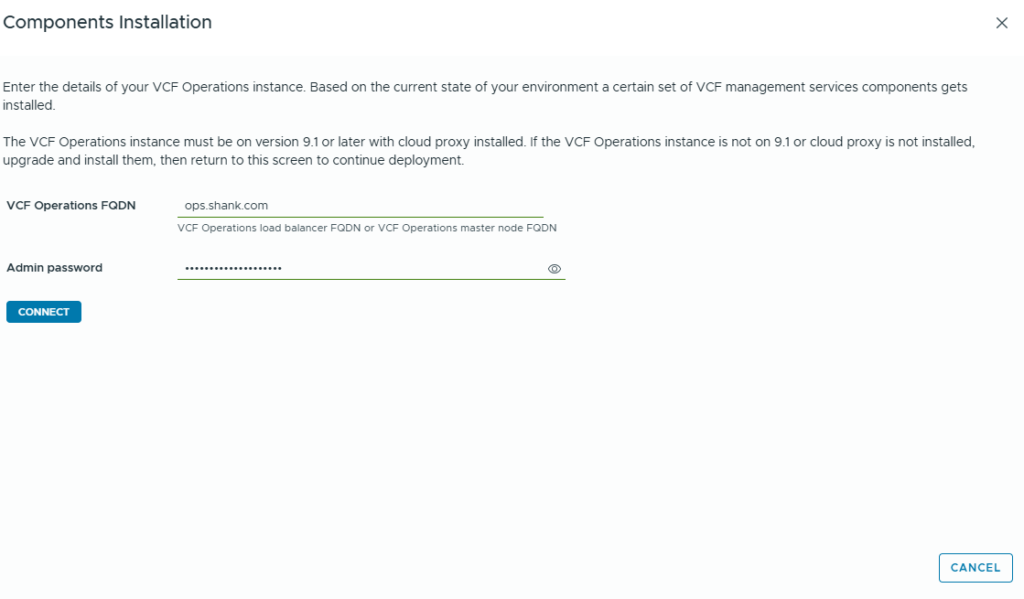
Redeploy VMSP
The check’s script shows what it tests: it reads which ESXi host each control plane VM runs on and fails if any host has more than one. With 3 control plane VMs and 2 hosts, it can never pass.
Coming in part 2: stale components left in VCF Operations and Fleet after the redeploy, and a Telemetry deploy stuck for 2 hours.
export KUBECONFIG=/data/vmsp/<runtime-name>.kubeconfig; kubectl get kcp -A
A very small but impactful difference in the t-shirt size. On the bootstrap VM, the Helm values only say clusterSize: small:
Summary
Don’t wait 45 minutes to find out. About 15 minutes in, check the control plane count from the new bootstrap VM. Desired and current should both be 1:
On a 2-host management cluster, pick Small, not Small (HA).
Check kubectl get kcp -A early instead of waiting 45 minutes.
A retry won’t help: it reuses the same spec.
The bootstrap VM’s installer log names the failing check. SDDC Manager’s log doesn’t.